At 9 p.m., the kitchen is finally quiet. Your child has eaten a few bites of a familiar brand of pasta, rejected the chicken, accepted a particular yogurt only after the label was checked, and fallen asleep later than usual. You meant to record everything, but now you're scrolling through blurry plate photos, searching text messages from another caregiver, and trying to remember whether the difficult afternoon happened before or after lunch.
Then comes the question at next week's dietitian appointment: “What has your child been eating?”
You don't need another calorie target. You need a record that survives busy days, preserves the details that matter, and helps you connect meals with sleep, behavior, reactions, and appointments. The right nutrition log app should reduce the burden of capturing information, organize it in a form you can review, and help you bring a useful question to your child's care team.
This guide focuses on autic and neurodivergent children, selective eaters, and families managing suspected sensitivities or allergies. It covers what these apps do, which features deserve attention, why photo recognition still needs caregiver review, how to interpret patterns cautiously, and how to share records without giving away more information than necessary.
Table of Contents
- The End-of-Day Food Journal Problem
- What a Nutrition Log App Actually Does
- Features That Matter for Selective Eaters and Allergy Families
- Why Photo Logging Still Needs a Human in the Loop
- Reading the Data Without Overclaiming
- Privacy, Data Sharing, and Who Sees What
- Choosing and Setting Up the Right App This Week
The End-of-Day Food Journal Problem
The ordinary food journal fails at the exact moment families need it most. A parent may remember breakfast clearly, then lose the details of school lunch, snacks in the car, a drink offered by a grandparent, and the food that was placed on the plate but never eaten. By bedtime, “chicken nuggets” may mean one familiar brand on one day, a restaurant version on another, or two bites that were immediately spit out.
Those distinctions matter. A selective eater's food history includes accepted foods, refused foods, brands, textures, preparation methods, portion changes, and whether the food was consumed. A handwritten note that says “ate pasta” may be too vague to help a dietitian understand whether the child tolerated a new shape, accepted a different sauce, or relied on the same packaged meal again.
A record needs context, not just entries
I learned this the hard way during years of IEP meetings and dietitian appointments. A stack of notes can look impressive while still failing to answer the question in the room. The problem usually isn't a lack of effort. It's that the record separates meals from the rest of the day.
A useful entry might place the meal beside:
- Sleep: Whether the child slept well, woke frequently, or started the day unusually tired.
- Behavior: What happened afterward, including triggers, intensity, duration, and setting.
- Sensory details: Texture, temperature, packaging, smell, appearance, or preparation.
- Care context: Who served the meal, where it happened, and whether school, therapy, travel, or medication changed the routine.
Practical rule: If recording the meal takes longer than living through the meal, the system will eventually lose the details you're trying to preserve.
A large retrospective cohort study of a public mobile nutritional-health intervention illustrates why meaningful use matters more than downloads. The researchers analyzed 37,214 app downloaders, with 19,805 users remaining in the primary analysis after eligibility screening. Of those eligible users, 13,232, or 66.8%, completed the intended three-day food diary and educational feedback dialogue. Across everyone who downloaded the app, completion was 35.6%, or 13,232 of 37,214, and only 8.5% of eligible participants were classified as long-term adherent (ETH Zurich study on digital food-diary engagement).
The lesson for families is simple. A nutrition log app shouldn't be judged by how many fields it offers. It should be judged by whether you can use it on the chaotic days, when your child refuses dinner, the caregiver forgets to write anything down, and the only evidence is a photo, a voice note, or a quick observation.
What a Nutrition Log App Actually Does
A useful nutrition log app performs three connected jobs. If one job is missing, the record may look polished but still fail at the appointment table.
First, it captures the moment
Capture means getting the meal, drink, supplement, refusal, or reaction into the system while the information is still available. That might happen through a voice note while you're packing a school bag, a photo before the plate goes to the table, or a quick selection from foods your child already eats.
Speed matters because parents rarely log in ideal conditions. You may have another child asking for help, a therapy session starting, or a child who can't wait while you type a detailed ingredient list. Voice capture and photo logging reduce the distance between what happened and what gets recorded.
Research on digital food records shows both the promise and the usability gap. In the U-DECIDE study, 67 participants were recruited and 59, or 88%, completed at least one three-day digital food record. Among 50 participants who completed an acceptance survey, 32, or 64%, rated the app easy or very easy to use, while 9, or 18%, rated it difficult or very difficult (U-DECIDE digital food-record research). Most participants could use the diary, but a meaningful group still struggled. Families caring for children face even more competing demands.
Then, it structures the mess
Structure turns “ate some noodles and seemed off” into a record with a date, time, food, portion estimate, preparation details, and optional notes about behavior or sleep. It also preserves corrections rather than hiding them.
A structured record can distinguish:
- Food offered from food consumed.
- A familiar brand from a newly introduced product.
- A meal photo from a confirmed ingredient list.
- A suspected reaction from a confirmed medical finding.
- A supplement entry from a complete meal.
That distinction makes later review possible. It also makes a personalised supplement guidance resource more useful as background reading, because families can bring a clearer record of current intake and questions to a qualified professional rather than relying on memory alone.
Finally, it surfaces patterns
Surface means turning many entries into something a human can understand. The app might show foods accepted most often, refusals by time of day, meals followed by a logged behavior, or changes during a period of poor sleep.
This separates a child-focused nutrition log from a typical weight-loss tracker. A calorie counter may ask whether you met a daily target. A family record should help answer questions such as, “Does my child eat less after a difficult night?” or “Are refusals concentrated around mixed textures?” Guiding Growth fits this three-job model through voice capture, snap-to-log meals, and an analytics dashboard that places food within the wider record of a child's day.
Features That Matter for Selective Eaters and Allergy Families
A useful feature earns space on your phone when it changes what you can understand or share. For selective eaters, that usually means preserving specificity and context, rather than collecting nutritional numbers without explaining the meal around them.
Ingredient detail comes first. The FDA recognizes nine major food allergens, and U.S. labels must identify the food source of each major allergen used in a packaged product. The list includes milk, eggs, fish, crustacean shellfish, tree nuts, peanuts, wheat, soybeans, and sesame (FDA overview of major food allergens).
| Allergen | Common Sources | Why Tracking Matters |
|---|---|---|
| Milk | Milk, cheese, yogurt, sauces | A meal category may hide dairy ingredients |
| Eggs | Baked goods, pasta, mayonnaise | Preparation can change exposure |
| Fish | Fish dishes, sauces, prepared foods | Ingredient-level records support clearer review |
| Crustacean shellfish | Shrimp, crab, lobster | Restaurant and mixed dishes can be difficult to identify |
| Tree nuts | Nut butters, baked goods, cereals | Brand and packaging details may matter |
| Peanuts | Peanut butter, snacks, sauces | Similar-looking foods may contain different ingredients |
| Wheat | Bread, pasta, crackers, coatings | The food name alone may not show the full exposure |
| Soybeans | Tofu, sauces, packaged foods | Ingredient lists can reveal less obvious sources |
| Sesame | Tahini, buns, crackers, packaged foods | Product dates and labels can affect what is declared |
Sesame became the ninth major food allergen under the FASTER Act. Mandatory U.S. labeling requirements took effect on January 1, 2023 (FDA information on sesame labeling). FDA guidance explains that the requirements applied to foods packaged on or after that date, while older products already in commerce could remain without the new sesame declaration (FDA sesame labeling guidance). A log that records the product, package, date, and preparation can therefore support a clearer review than an entry such as “cracker” or “sandwich.”
Refusal is data too
Many apps reduce a meal to eaten or not eaten. Selective eating needs more detail. A refused food may point to a texture barrier, packaging change, temperature preference, difficult transition, or low appetite. Record what was offered and how the child responded without turning the entry into a judgment.
A 2025 study of dietary intake among autistic children reports lower fruit and vegetable consumption and more vitamin and mineral insufficiencies, and found that 38.2% of autistic children exceeded 125% of estimated energy requirements, compared with 22.9% of controls (research on dietary intake among autistic children). The finding illustrates why energy intake alone cannot describe diet quality.
A suitable app should record accepted foods, refused foods, supplements, texture, brand consistency, and food-chaining progress. It should leave interpretation to caregivers and qualified professionals, rather than turning a refusal into noncompliance or generating a rigid diet plan.
Keep meals beside sleep and behavior
A meal record becomes more useful beside sleep, hydration, medication, bowel movements, mood, and behavior. The purpose is not to assign every difficult moment to food. It is to preserve enough surrounding context for a better question, such as whether refusals cluster after poor sleep or during changes in routine.
Look for customizable behavior fields, time-of-day filters, date ranges, and notes about location or caregiver. These fields make the log a coordination tool for parents, grandparents, therapists, school staff, and clinicians.
Reports also need to work outside the app. A useful export should show the selected date range, included event types, plain-language notes, and a PDF or printable format that a dietitian, pediatrician, therapist, or school team can review without accessing the family account.
Families can use this guide on using food trackers for autism diets to decide what to record before opening an app. Sharing controls matter just as much. A co-parent may need meal access, a grandparent may only need permission to add entries, and a clinician may need a time-limited report instead of the child's complete history.
Why Photo Logging Still Needs a Human in the Loop
Photo recognition is useful because taking a picture is often easier than completing a form. It isn't a final answer, especially when the plate contains a homemade casserole, a partially eaten sandwich, a sauce, or a familiar food prepared in an unfamiliar way.
One 2025 randomized trial found that automatic image recognition correctly identified 86% of dishes but accurately reported only 68%, showing that recognizing a dish and estimating its nutrition are different tasks (2025 trial of automatic image-based dietary assessment). Portion estimation adds another layer of uncertainty. In a peer-reviewed evaluation of digital food images, fewer than one-third of participants estimated portions within 10% of the true amount, with reported errors of approximately 44% for one image format and 48% for another (peer-reviewed evaluation of digital food images).
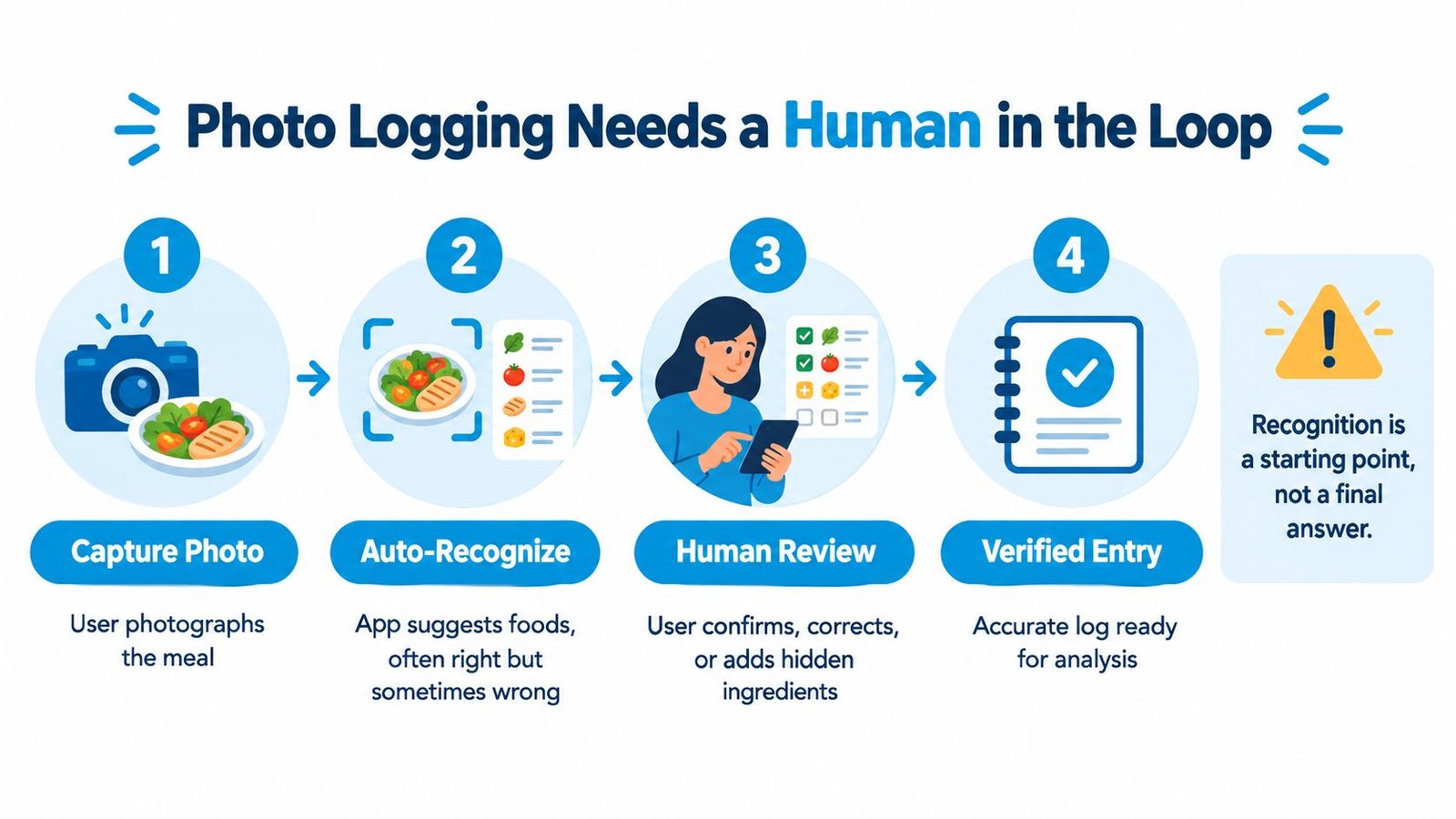
Recognition is not confirmation
For a selective eater, the difference between “food identified” and “food accurately logged” can be substantial. A photo may show pasta, but it can't reliably tell you which brand was used, whether the sauce contained dairy, how much was eaten, or whether the child only touched the food.
A safer workflow looks like this:
- Capture: The caregiver photographs the plate before or after eating.
- Suggest: The app proposes food identities, ingredients, and a portion estimate.
- Review: The caregiver confirms, removes, corrects, or adds items.
- Save: The app preserves the original photo and the verified entry.
High-impact cases deserve an explicit confirmation step. That includes mixed dishes, soups, sauces, restaurant meals, suspected allergens, and foods connected to an elimination diet. The record should retain the original image, predicted food, estimated portion, confidence score, and user correction.
A confident guess is still a guess. The app should make correction easier than blind acceptance.
Guiding Growth's snap-to-log meals illustrate this approach. The photo is analyzed, foods and portions are suggested, and the caregiver reviews the entry before saving. That review is especially important when the goal is not perfect calorie arithmetic but a credible record for identifying patterns and preparing for a clinician conversation.
The food database also needs provenance. USDA FoodData Central describes an integrated system containing nutrient and food-component data, with different data types including Foundation Foods and the Food and Nutrient Database for Dietary Studies (USDA FoodData Central FAQ). A careful record can retain the food identifier, source database, serving unit, gram conversion, preparation state, nutrient basis, allergen flags, and database revision date. That level of detail helps distinguish a genuine change in intake from a corrected portion or updated food entry.
Reading the Data Without Overclaiming
A nutrition log can show a pattern without proving a cause. Parents understandably look for explanations when a child has a difficult day, a poor night of sleep, or a sudden change in eating. The safest use of the record is to generate a focused question, not a diagnosis.
Start with a manageable window. Select a week or two of meals, sleep, and behavior rather than reviewing every entry you've ever made. Then group the information by time of day, day of week, food type, preparation, location, and recent events such as school changes, illness, travel, or therapy.
Turn a suspicion into a question
Suppose your child has several difficult afternoons. A useful review might show that those afternoons followed short sleep, a missed snack, a change in the usual lunch brand, or a demanding transition at school. The app hasn't identified a cause. It has helped you narrow the conversation.
Bring questions such as:
- “I noticed refusals were more common after meals with mixed textures. Could we discuss texture progression?”
- “Several difficult afternoons followed poor sleep and limited lunch intake. How should we think about the relationship?”
- “This product changed packaging. Should we compare the ingredient lists before drawing conclusions?”
- “The log shows repeated gaps in accepted foods. What should we review with a dietitian?”
Guiding Growth's Smart Summaries can package selected date ranges and event types for an IEP, 504 review, or specialist meeting. The value is in making the record readable. A report can show what was logged, while the child's care team handles clinical interpretation.
Preserve uncertainty
Avoid treating one meal or one difficult day as evidence. Also avoid assuming that a food listed near a symptom caused it. Sleep, constipation, medication changes, sensory overload, illness, communication barriers, and school demands may all overlap.
A careful app should let you label an observation as suspected, confirmed by a professional, refused, partially eaten, or unknown. It should also allow corrections, because a parent who reviews the record later may remember that the child ate only two bites or that the “new” food was the same brand in different packaging.
Bring patterns, not verdicts. The strongest appointment question is specific, dated, and open to more than one explanation.
Privacy, Data Sharing, and Who Sees What
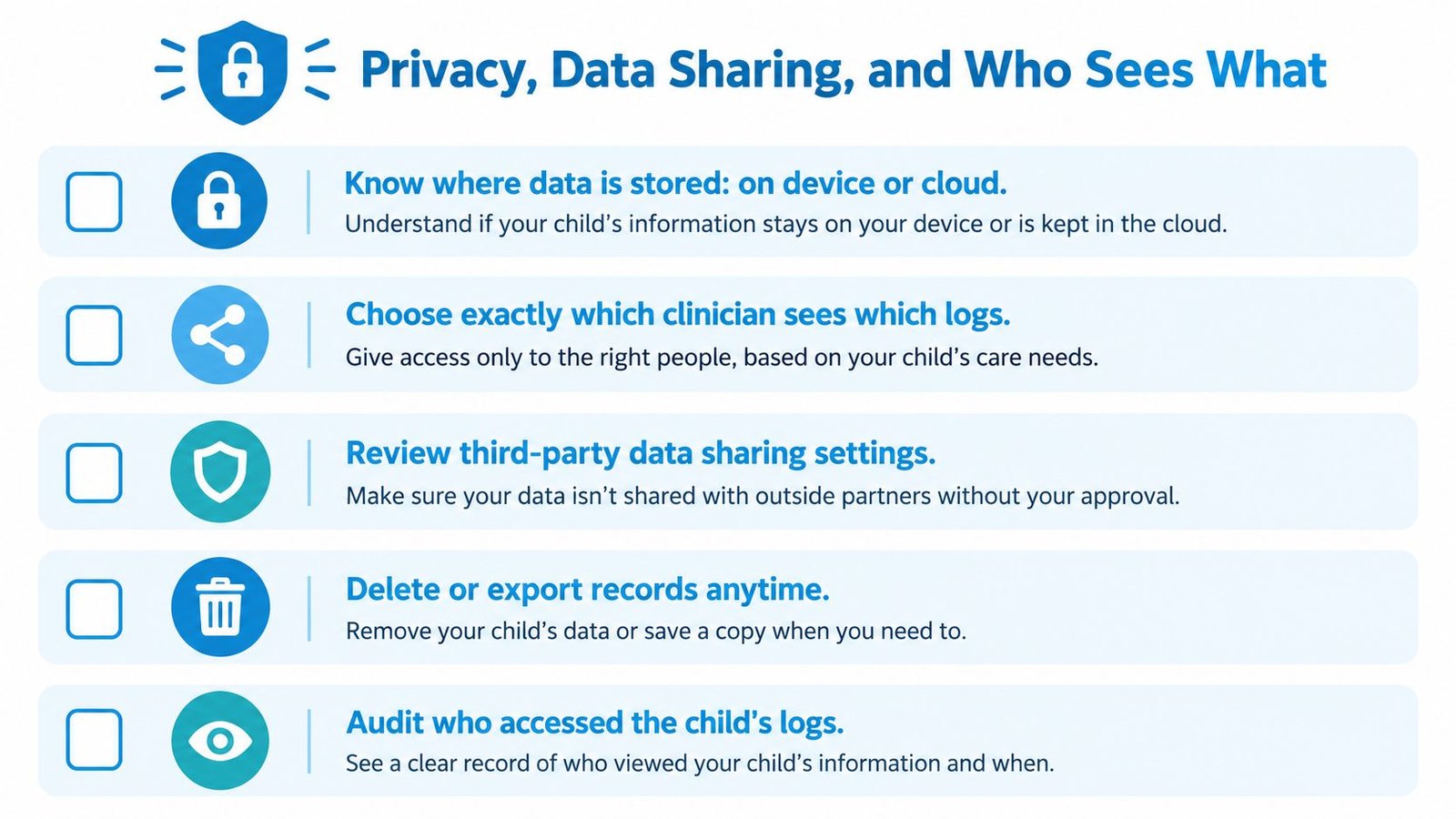
A food log can show more than meals. Add behavior, sleep, medication, therapy, and reactions, and the record may reveal a child's health needs and a family's routines. Before installing a nutrition log app, find out where the data lives, who can access it, how you can export it, and what happens when you delete the account.
Look for clear answers about:
- Storage: Whether records stay on the device, move to cloud storage, or use both.
- Security: How information is protected during transfer and while stored.
- Third parties: Whether the company sells, shares, or uses data to train models.
- Deletion: Whether you can delete records and obtain a usable export first.
- Access history: Whether the account shows who viewed or changed a child's information.
A screen share, PDF export, and live account access expose different amounts of information. Screen sharing shows whatever appears during the call. A PDF can limit the record to a chosen date range and selected event types. Live access may help a care team review updates, but it requires careful permissions and regular checks.
Sharing should follow the caregiver's role
A grandparent may need to record meals without reading therapy notes. A therapist may need behavior entries but not medication details. A co-parent may need broader access, while a dietitian may need only a selected report for an appointment. Match access to the person's job, rather than giving every collaborator the same view.
Guiding Growth's HIPAA-compliant app information outlines privacy and sharing questions for families comparing child-focused tracking tools. Its Alma assistant is designed to use a child's logged context to answer a parent's questions within the app. That differs from automatically sending the information to an unrelated third party, but parents should still confirm the current policy and settings before use.
For broader background, these privacy tips for wellness trackers cover questions about collection, access, and sharing. Those questions also apply when the record belongs to a child.
Before you begin, confirm that you can:
- See exactly who has access.
- Choose which event types each person can view.
- Export the record in a usable format.
- Delete the account and its data.
- Understand whether the company uses data for model training.
- Correct an entry without losing its original context.
Ingredient-level records can reveal suspected sensitivities, diagnoses, and treatment concerns. Treat a child's food log with the same care as medical records. Confirm who can export it, limit access to the people who need it, and review collaborator permissions after every change in the care team. Protecting the record matters as much as organizing it.
Choosing and Setting Up the Right App This Week
Start with one question, not a long list of goals. Are you trying to understand a suspected allergen, a feeding pattern, a meal-and-behavior connection, or a nutrient gap among accepted foods? Choose two or three event types and log them consistently. Trying to capture every detail immediately usually creates the same end-of-day burden you're trying to escape.
Use this short test before committing:
- Capture: Can you record a meal by voice, photo, or quick entry during a difficult day?
- Review: Can you correct the food, brand, portion, preparation, and amount consumed?
- Context: Can meals sit beside sleep, behavior, medication, hydration, and reactions?
- Analysis: Can you filter by date range, time of day, behavior, or food?
- Sharing: Can you create a readable PDF or printable report for an appointment?
- Privacy: Can you control collaborators, export records, and delete data?
Before the first entry, decide what a useful report should show at your next appointment. Then check sharing permissions, invite only the people who need access, and explain to every caregiver what “offered,” “tasted,” and “eaten” mean in your family's record.
A practical nutrition log example can help you picture the difference between a meal list and a daily record with context. Guiding Growth is one option for families who want voice capture, reviewed meal photos, behavior and sleep annotation, and meeting-ready summaries in the same place. The first week doesn't need to be perfect. It needs to be usable enough that you can keep going.
Guiding Growth gives families one place to log meals, food reactions, sleep, behavior, medications, and daily context, then turn those entries into patterns and shareable summaries. If you're tired of reconstructing your child's eating history from memory before every appointment, visit Guiding Growth and see whether its nutrition and caregiver-coordination tools fit your family.