Teaching social skills to autistic children can be challenging, but visual supports make it easier by turning abstract social rules into clear, visual cues. These tools – like pictures, schedules, and videos – help children process information at their own pace, reduce anxiety, and build independence. Research supports their effectiveness across all ages and abilities.
Key takeaways:
- What are visual supports? Tools like images, symbols, or videos that provide clear guidance.
- Why do they work? They simplify social rules, reduce stress, and cater to visual learning strengths.
- Examples: Visual schedules, cue cards, social stories, video modeling, and timers.
- How to use them: Start simple, pair with verbal instructions, and gradually reduce reliance.
Visual supports empower children to navigate social interactions with confidence and independence, making them a practical tool for parents, teachers, and therapists.
Visual Supports I Use as an OT to Help Kids with Autism & ADHD
sbb-itb-d549f5b
Why Visual Supports Work for Teaching Social Skills
Navigating social situations often means interpreting complex, unwritten rules in real time. For autistic children, juggling spoken instructions and social cues can feel overwhelming. Visual supports simplify this by transforming fleeting, abstract information into clear, tangible cues.
Creating Predictability and Lowering Anxiety
One of the biggest challenges for autistic children is dealing with the uncertainty of what’s coming next. Visual schedules help by laying out a clear, step-by-step sequence of events.
"Anxiety around ‘what’s happening next?’ is one of the most common challenges for students with ASD. A visual schedule answers that question all day long without the student needing to ask." – ClassroomToolsReview [1]
For example, a visual schedule might outline steps for a social interaction, such as greeting a friend, taking turns in conversation, and saying goodbye. By making these steps visible, children can focus better on the interaction itself. However, consistency is crucial – if the schedule is inaccurate or skipped, it can lead to confusion and increased anxiety [1].
Improving Comprehension and Communication
Spoken instructions disappear the moment they’re given, but visual cues stay in place, allowing children to process them at their own speed. This is especially helpful for children who need extra time to understand verbal information.
"Children with autism spectrum disorder (ASD) struggle with processing verbal information or cues, thus depending on visual supports to aid in understanding." – Nidia Saisbhan Lashley, NASET [4]
Many autistic children are naturally strong visual learners, often grasping concepts better through images than words. Visual supports can clarify abstract ideas like personal space, conversational tone, or the flow of a discussion. Studies comparing visual aids to verbal-only instruction have shown that visual supports lead to better performance across various skill areas [4].
By improving understanding, these tools also encourage more independent participation in social situations.
Building Independence and Confidence
The ultimate goal of visual supports is to help children navigate social situations on their own. A well-designed visual cue allows a child to refer to it independently, reducing the need for constant adult intervention.
A 2021 study by Jiminez-Gomez, Haggerty, and Topçuoğlu explored this with wearable visual schedules. Three boys with ASD (ages 3–5) used watches displaying activity icons that vibrated to signal transitions. Before using the watches, their independent engagement ranged from 14–22%. With the visual prompts, all three reached 100% independent engagement, showing a shift from relying on adult guidance to managing activities on their own [4].
Strategically placing visual supports within easy reach empowers children to take control of their interactions, fostering both independence and confidence over time [1].
Types of Visual Supports for Social Skills Training
Visual supports are a game-changer when it comes to teaching social skills, as they transform abstract concepts into clear, actionable steps. Each type of visual support caters to specific needs, making them essential tools for effective training.
Visual Schedules and Cue Cards
A visual schedule lays out the steps of a social interaction in a clear sequence. For instance, it might outline: "Say hello → Ask a question → Listen → Take turns → Say goodbye." This step-by-step guide helps children navigate social situations with confidence.
For more complex interactions, mini-schedules break tasks into smaller, more manageable parts. For example, instead of just labeling an activity as "group work", a mini-schedule might specify: "Ask to join → Wait for an answer → Share materials → Say thank you."
"What looks like ‘can’t do this’ is often ‘can’t hold all these steps in working memory at once.’" – Treetop ABA Therapy [2]
Cue cards are portable prompts that provide quick reminders during real-time social interactions. A card might feature an image of a child making eye contact with the phrase "Look and listen" underneath. These are particularly helpful for providing subtle, in-the-moment guidance without requiring adult intervention.
Next, let’s look at narrative-based supports that bring social scenarios to life.
Social Stories and Comic Strip Conversations
Social stories are short narratives designed to prepare children for specific social situations. They explain what’s happening, how others might feel, and what an appropriate response looks like. These stories are especially useful for predictable but challenging events, like meeting new people or participating in group activities.
Social stories use a mix of descriptive, perspective, and directive sentences to guide children toward appropriate actions.
Comic strip conversations, developed by Carol Gray, take this concept a step further by visualizing social exchanges through simple drawings and speech bubbles. These conversations help children understand what others might be thinking or feeling, making abstract social dynamics easier to grasp.
Video Modeling and Visual Timers
Dynamic tools like videos and timers provide real-time behavioral cues, complementing static supports.
Video modeling shows children exactly how to perform a desired social behavior. For example, a short clip might demonstrate how to greet someone, handle losing a game gracefully, or ask for help. Watching a peer or relatable character perform the skill gives children a clear mental image to emulate.
The Power Card Strategy (PCS) uses a child’s favorite character to model social behaviors. A small card featuring, say, a beloved superhero, outlines the "rules" for a social situation in simple steps. This approach encourages children to act like their hero. A 2026 meta-analysis found PCS to be highly effective, with a Tau-U weighted aggregate mean treatment effect of 0.76, supporting its use as an evidence-based practice for children with ASD [3].
Visual timers tackle the challenge of understanding time, which can be abstract and confusing for many children with ASD.
"Time is an abstract concept, and many students with ASD struggle with it profoundly. ‘You have five minutes left’ is meaningless if a student doesn’t have an internal sense of what five minutes feels like." – ClassroomToolsReview [1]
Tools like the Time Timer, which uses a disappearing red disc to visually represent time left, make transitions and turn-taking much easier. By seeing time pass, children can better anticipate changes, reducing stress and resistance [1].
These tools create a strong foundation for teaching and reinforcing social skills, paving the way for their practical application in engaging social skills activities and everyday situations.
How to Use Visual Supports in Social Skills Training
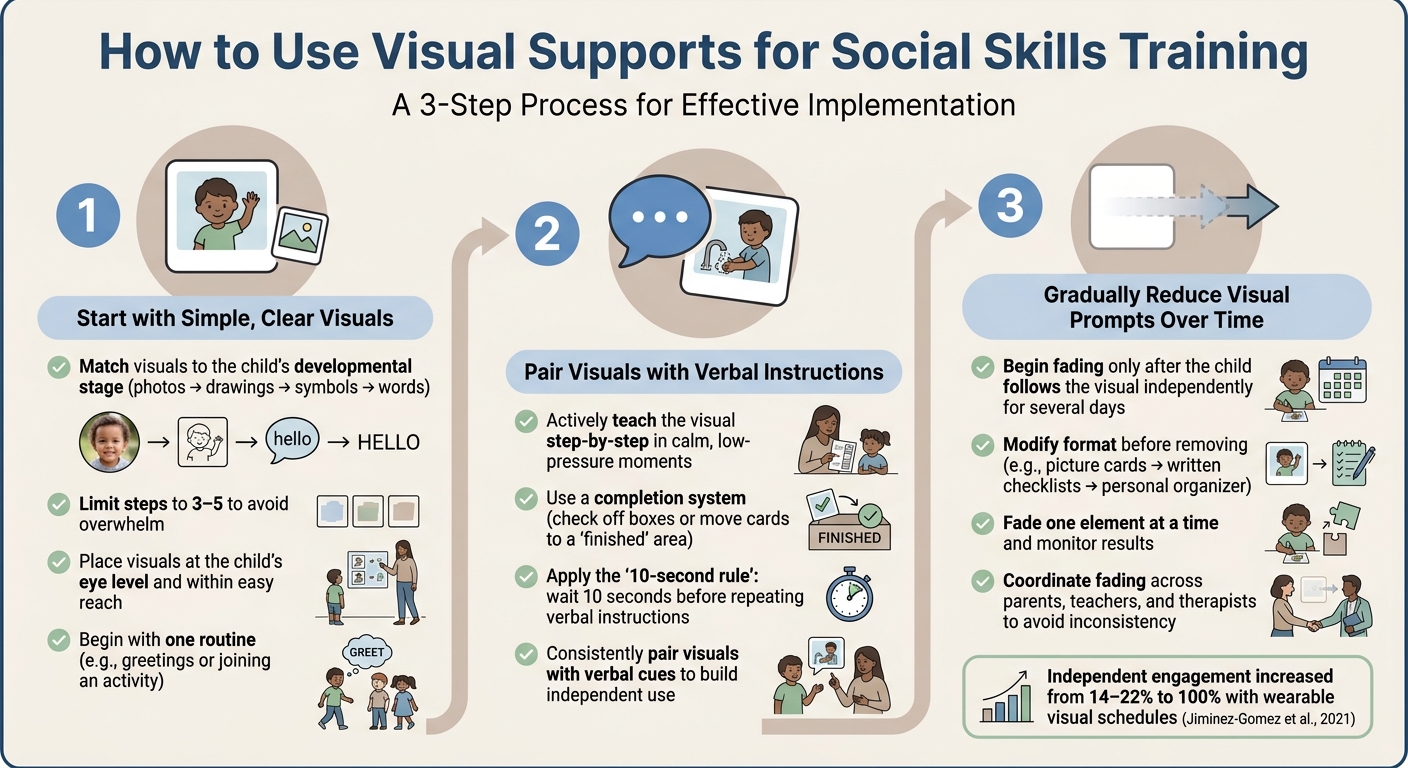
How to Use Visual Supports for Social Skills Training
Once you’ve chosen the right visual support, how you introduce and use it daily is crucial for reinforcing social skills. The way you implement these tools can determine whether a child gains real benefits.
Start with Simple, Clear Visuals
Select visuals that match the child’s developmental stage. For example, a child who can’t read yet won’t gain much from a text-based checklist. Instead, a photo of themselves completing a task can be much more effective. As their understanding grows, you can gradually move from real photos to line drawings, symbols, and eventually written words. Keep the steps limited to 3–5 to avoid overwhelming them visually. Also, make sure the visuals are placed at the child’s eye level and within easy reach so they can use them independently.
Start small by focusing on one routine – like greetings or joining an activity – instead of trying to plan out the entire day.
Pair Visuals with Verbal Instructions
Visual supports are most effective when actively taught, rather than simply displayed. Take time to explain the visual step-by-step in calm, low-pressure moments. As you go through each step, consider using a simple completion system, like checking off a box or moving a card to a "finished" area. This helps reinforce the sequence and makes the process more interactive.
When giving verbal instructions alongside visuals, try the "10-second rule": wait at least 10 seconds before repeating yourself. This pause gives the child time to process both the verbal and visual cues without feeling rushed [2]. Consistently pairing visuals with verbal instructions helps the child connect the visual to the expected behavior, laying the groundwork for independent use.
Gradually Reduce Visual Prompts Over Time
Once the child can follow the visual support independently for several days without needing verbal reminders, begin reducing the support by modifying its format before removing it altogether. For instance, if they’ve been using picture-based cue cards, transition to written checklists. If they’ve been using a large wall-mounted schedule, switch to a smaller, personal organizer. These changes maintain a sense of familiarity while encouraging progress toward using more independent tools.
"Try fading one element at a time and monitoring the result. But don’t pull supports just because a student seems to be ‘doing fine.’ They might be doing fine because of the visual supports." – ClassroomToolsReview [1]
It’s also important for parents, teachers, and therapists to coordinate when fading supports to avoid inconsistent expectations that could confuse the child. Gradual fading encourages self-reliance while reinforcing the social communication skills they’ve been building.
Tracking Progress and Updating Visual Supports
Visual supports aren’t static tools – they need to grow and adapt as a child’s social skills, environment, and needs change. Regularly evaluating whether a support is still effective, and making updates when it’s not, is just as crucial as selecting the right tool in the first place.
Recognizing Signs of Progress or Difficulty
Progress often shows up in small but meaningful changes. For instance, a child who used to struggle with transitions might start moving between activities more smoothly or independently refer to a cue card. These subtle shifts suggest the visual support is helping the child better understand and manage daily structure [5].
On the flip side, difficulty can look like a child ignoring the visual, appearing confused by it, or even becoming more dysregulated when it’s used. For example, a child might manage fine at school but struggle at home, signaling inconsistencies in the support plan across environments [5]. A decline in previously mastered skills is another red flag.
"Visual schedules work because they offload the cognitive effort of anticipating the day’s structure into something the child can see and refer to." – Nesto [5]
Keeping a weekly developmental diary can help uncover patterns and provide concrete evidence to share with care teams [5]. These observations are key to knowing when adjustments are needed.
Adjusting Supports for New Social Goals
As children grow, their social goals and support needs evolve. A visual tool that once relied on picture-based cue cards might eventually transition to written reminders – or no reminders at all. What works at one stage could become a barrier later [5].
When updating visuals, focus on the specific goal that’s shifted. For example, if a child has become more comfortable joining group activities, the next step might involve a visual aid for practicing conversation skills, like taking turns speaking. Introduce the updated visual in a calm, familiar setting before using it in more challenging social situations. If a support consistently fails in a particular context, it may also be worth adjusting the environment itself.
These updates are part of helping children move from guided interactions toward greater independence.
Using Guiding Growth to Track Social Development
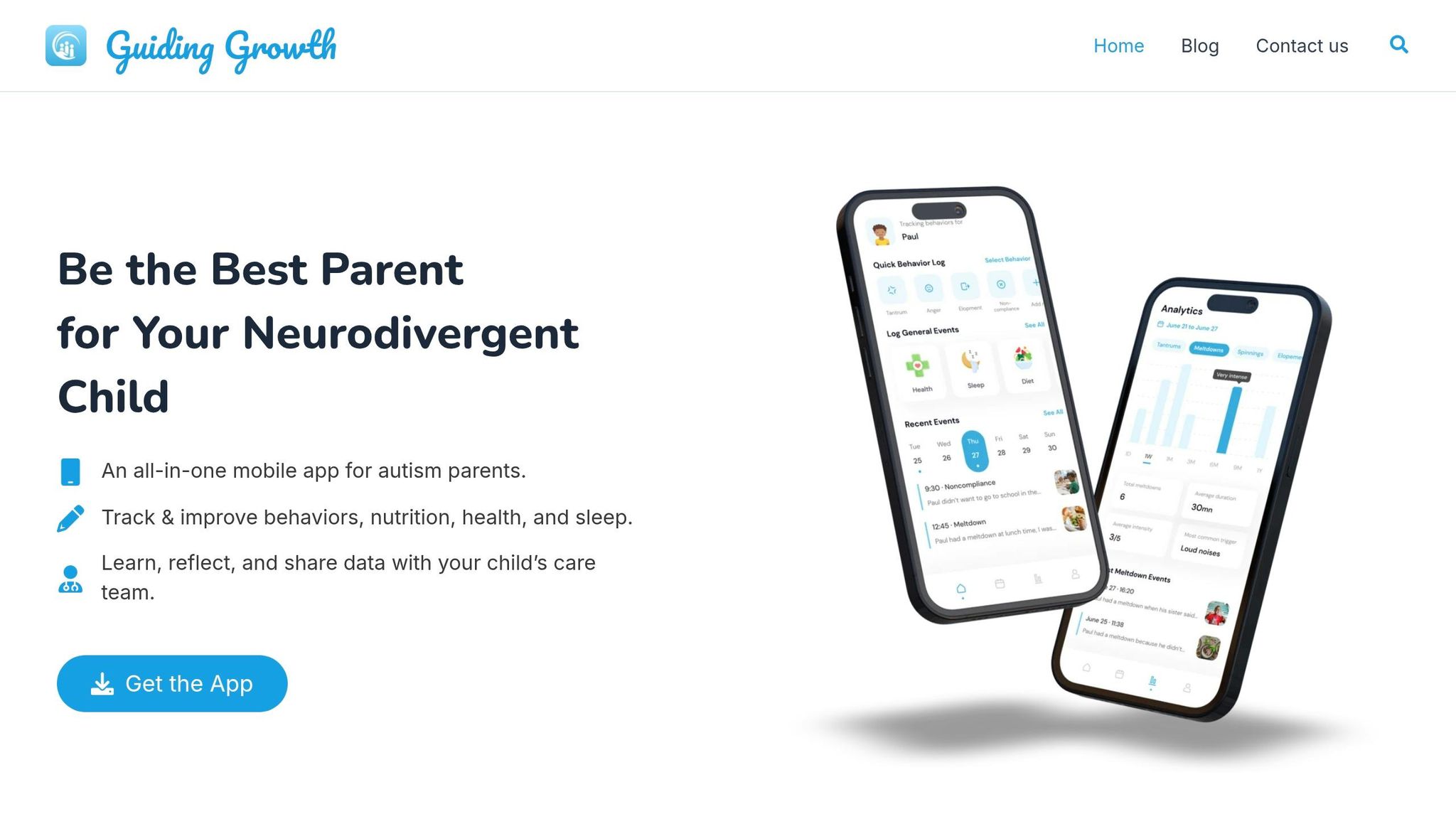
Tracking changes consistently is essential for refining and updating visual supports. Relying on memory alone often leads to errors. Research highlights this issue: while paper and electronic diaries both show high completion rates (about 90%), only 11% of paper diaries are actually filled out in real time, leading to potential inaccuracies [7].
Guiding Growth provides a structured way for parents to log behaviors like meltdowns, stimming, or demand avoidance in real time, alongside factors such as sleep quality and mood. Over time, these logs create clear patterns that help determine whether a visual support is effective [6][7]. As one parent shared:
"Being able to define specific events and pinpoint my daughter’s triggers and see it in data form would be so helpful!" – MamaPutz, Guiding Growth User [6]
These patterns aren’t just for personal insight. Sharing data-backed reports at IEP meetings or therapy sessions equips care teams with detailed information, making it easier to align visual supports across home, school, and clinical settings [5][7].
Conclusion: Supporting Social Growth with Visual Tools
Teaching social skills to autistic children takes time, and visual aids are a dependable way for parents and caregivers to provide support. Tools like simple cue cards, social stories, and video modeling help reduce the mental effort required, offering a sense of predictability that helps children feel more at ease.
Research highlights the importance of consistency across different environments. When support varies between settings, it becomes harder for children to apply what they’ve learned. Using visual cues consistently across home, school, and other settings helps unify efforts among caregivers.
"Parent involvement in a child’s development is one of the most consistent predictors of good outcomes." – Nesto Complete Autism Parent Guide [5]
To build on this, formalizing these supports through the IEP process ensures that visual tools and social goals are aligned across all settings. Parents who actively engage as part of the IEP team can advocate for specific visual aids and social objectives to be documented and implemented consistently. Starting this process early – ideally at least three months before the school year begins – allows enough time for everyone to prepare and collaborate effectively [5].
Tracking progress is equally important. Changes often become noticeable within 10–14 days, such as a child glancing at a cue card without prompting or transitioning between activities more smoothly [8]. Keeping a record of these moments, rather than relying on memory, helps caregivers and educators turn daily observations into measurable progress, enabling informed decisions about the child’s evolving needs.
Digital tools like Guiding Growth can make this process even easier. By compiling data from different environments, the platform supports collaboration among parents, teachers, and therapists, ensuring that social supports adapt as the child develops. This shared approach allows the entire care team to stay aligned and responsive to the child’s progress.
FAQs
How do I pick the best visual support for my child?
When selecting visual supports, focus on your child’s unique needs and challenges. For instance, if transitions are difficult, try visual schedules or timers. For tasks that require step-by-step instructions, task strips can be helpful. Start by introducing these tools gradually, demonstrating how to use them effectively. Involve family members to ensure consistent use across different settings. The goal is to align the support with your child’s needs and practice regularly to build familiarity and confidence.
What if my child ignores or becomes upset by visual supports?
If your child seems to resist or become upset by visual supports, it might have to do with how they’re being introduced or utilized. Begin with straightforward, familiar visuals that align with their interests or preferences. Gradually demonstrate how to use them in a way that feels natural. Pay close attention to their responses and make adjustments as needed. To make the experience more positive, create a calm setting, offer them choices, and introduce the supports consistently but without pressure. This can help them feel more comfortable and engaged over time.
When and how should I fade visual supports without setbacks?
Gradually reduce visual supports, but only when the child is prepared, to prevent setbacks. Begin by simplifying schedules, transitioning from pictures to text, or introducing personal checklists. Make these changes slowly and pay close attention to how the child responds. If you notice resistance or any signs of regression, take a step back and reevaluate. The focus should always be on helping the child build independence and confidence, rather than removing supports prematurely because they seem to be doing fine.