Medication nonadherence in the United States is attributed to approximately 125,000 deaths, 11% of hospitalizations, and $100 billion to $300 billion in additional annual spending, according to the CDC Million Hearts summary on medication adherence. That scale changes what you're shopping for. You're not looking for a louder alarm. You're looking for a record you can trust when a prescriber asks what was given, what was skipped, and what changed around that time. For a child, that record is made by adults, often more than one adult, often when they're tired. The best medication tracker app for iPhone is the one that makes that record easy to create, easy to share with the right people, and hard to misread later.
Table of Contents
- Quick Picks for Medication Trackers on iPhone
- Apple Health for Dose Logs Without Extra Apps
- Dedicated Reminder Apps and the Verification Gap
- Whole-Child Platforms Like Guiding Growth
- How the Options Compare on Each Criterion
- Who Sees Your Child's Medication Data
- Choose the Setup That Fits Your Household
Quick Picks for Medication Trackers on iPhone
There's no single best choice for every family. The right pick depends on who gives the doses and who needs to see the record. A solo parent with one stable medication needs dependable alerts. Two homes, a grandparent, and a school nurse need shared access and a clear history. Those are different problems, and one app rarely solves both equally well.
On iPhone, you face three real option types. Apple Health is already installed and handles native reminders well. Dedicated pill reminder apps focus on schedules and alert styles. Whole-child platforms log medication beside behavior, sleep, meals, and therapy, so patterns sit in one timeline.
| Option | Best for | Main gap | Caregiver sharing |
|---|---|---|---|
| Apple Health medication feature | One parent with a short, stable medication list | No documented shared-caregiver workflow | Not described in Apple's medication documentation |
| Dedicated pill reminder apps | Strict routines that depend on alerts | Reminders alone do not prove a dose was taken | Single account in most cases, confirm second-caregiver access in the current version |
| Whole-child platform such as Guiding Growth | Families tracking medication with behavior, sleep and therapy | Not a source of medical advice, interaction checks not described | Per-person permissions for viewing, adding and managing the profile |
The need for a record, not just a ring, is plain in the adherence numbers. The CDC review of medication adherence interventions reports that approximately one in five new prescriptions is never filled, and among filled prescriptions, about 50% are taken incorrectly, especially regarding timing, dosage, frequency, or duration. A tracker can't fill a prescription for you. It can make timing visible, show missed doses before they become a pattern, and keep refill gaps from hiding in memory.
A reminder tells you a dose is due. A tracker shows you what actually happened.
Start by finding the row that matches your household. Then check how that option handles follow-up alerts, skipped doses, sharing, and export before you commit your child's full medication list to it.
Apple Health for Dose Logs Without Extra Apps
If you want dose logs without installing anything else, start with what's already on the phone. This photo shows the simple setup many parents rely on, an iPhone within reach at dose time.
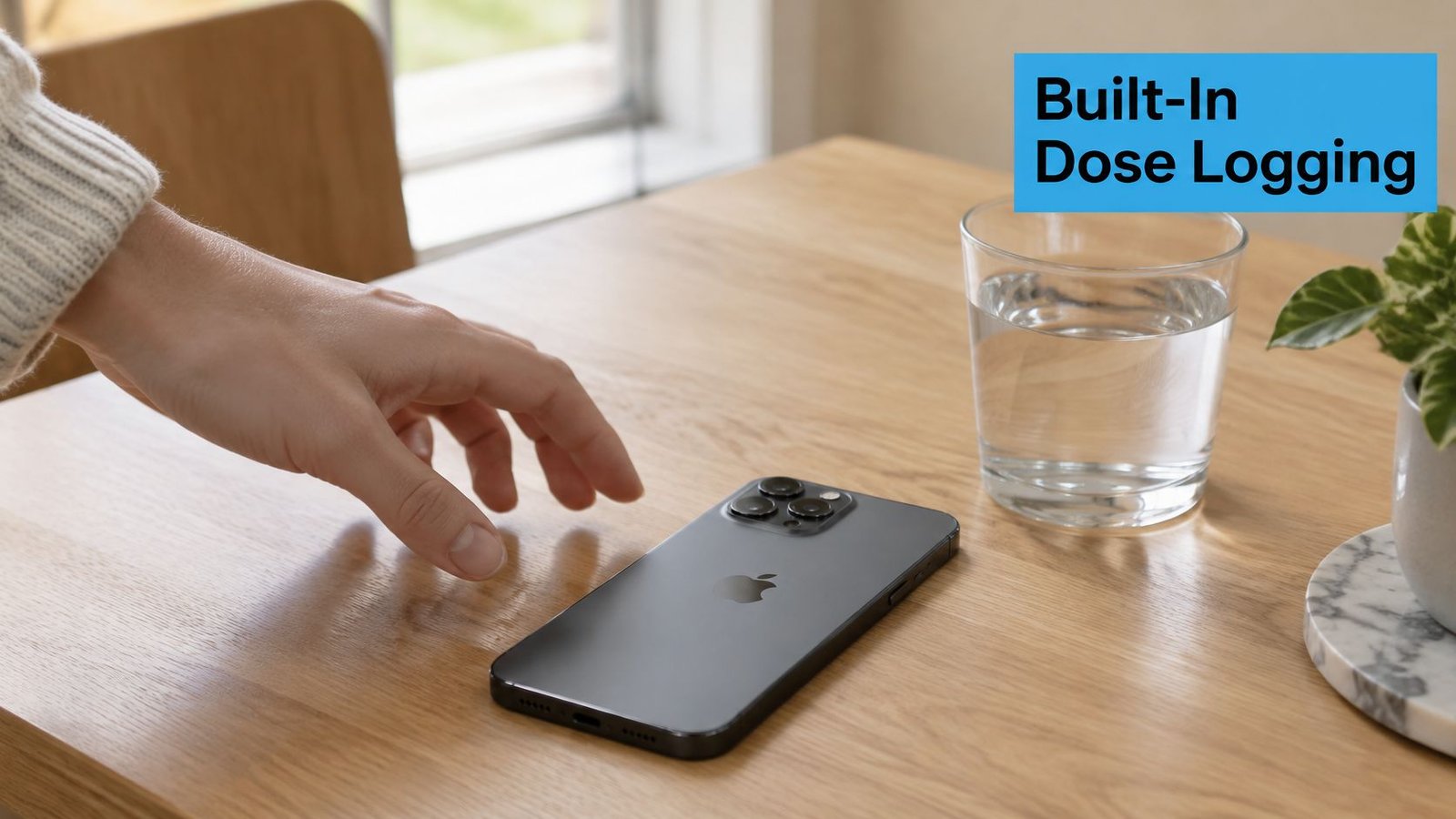
Apple Health stores medications, vitamins, and supplements, with scheduled and as-needed entries, custom schedules, and dose notifications. The Apple Support guide for adding and logging medications describes logging a dose as "Taken" or "Skipped" directly from an iPhone, iPad, or Apple Watch notification. That one tap is the core loop, and it's a good one, because it records the outcome at the moment you act.
Set It Up in Order
Don't add your whole list and hope alerts work. Test first.
- Add one medication: Enter the name, dose, and schedule exactly as prescribed.
- Allow notifications: Confirm reminders can reach the Lock Screen.
- Turn on Critical Alerts: Use them for doses that must not be missed, since they can appear and play a sound even when the iPhone is muted or a Focus mode is active.
- Confirm the follow-up: Leave a test dose unlogged and check that a second reminder fires 30 minutes later.
- Log a test skip: Mark it "Skipped" and confirm it appears in history, not just dismissed.
On Apple Watch, you can also snooze briefly instead of logging right away. That's useful when you're mid-task, but don't let snoozing replace logging. A delayed tap should still end in Taken or Skipped.
This short video walkthrough helps if you're setting up notifications for the first time.
Test the Conditions That Break Routines
Run your test dose through Focus mode, silent mode, low-power mode, and a disconnected Apple Watch. Those are the states your phone will be in at school pickup, at work, or overnight. If an alert fails there, fix settings now, not after a real missed dose.
Apple Health has clear limits. Its documentation doesn't describe shared administration across caregivers, adherence dashboards, or clinician-facing reports. It also holds no behavior, sleep, or therapy context beside the dose. For one or two stable medications with one main logger, that may not matter. For a care team, it's the reason you'll need more.
Dedicated Reminder Apps and the Verification Gap
Dedicated reminder apps offer flexible schedules, repeat alerts, refill counts, and colorful pill views. These tools can help a routine stick, but an alert is not a record that someone gave the dose.
Parents may compare Medisafe, MyTherapy, and Round Health. Treat features on their store pages as unconfirmed until you check the current version on your iPhone. Features can change, move behind paywalls, or have different sharing rules.
Evidence for medication apps is encouraging, with limits. A 2025 systematic review in JMIR of 14 randomized controlled trials found that all studies reported improved adherence with mobile-app interventions, while only 10 found statistically significant improvement. The trials also used varied features. An alarm can prompt action, but it cannot confirm that a dose was given.
Five Verification Questions to Ask Any App
- Does confirmation create a record? Check whether tapping the alert saves a dose entry or only dismisses the notification.
- Can a skipped dose include a reason? Refused, asleep, ran out, and withheld on medical advice describe different situations.
- Can you view changes on one timeline? Dose changes, refill gaps, and side effects are easier to review together than in separate notes.
- Can another caregiver see the same history? Shared access matters when several adults take turns giving medication. Check that it works without sharing a personal login and password.
- Can you export the history? A readable record is more useful for a clinician than a streak counter. A structured medication log designed for caregivers can help keep entries organized.
For a child, a logged confirmation is evidence that a named adult recorded giving a dose at a stated time. It cannot prove the child swallowed the medication. If an app does not save who logged the dose and when, it offers less accountability than a plain alarm paired with a dependable logging habit.
Families managing psychiatric medications also need to distinguish dose records from clinical assessment. An app can capture what a caregiver recorded, while medication decisions and observed response are addressed with the care team. Families seeking background on that process can explore psychiatric medication management.
Practical rule: If confirming a dose does not change the history, you have an alarm, not a tracker.
These apps can suit a household with one medication, one person logging, and a routine that needs reminders. When several adults give doses, shared access and a clear record matter more than alert sounds.
Whole-Child Platforms Like Guiding Growth
Some families don't need another pill list. They need medication to sit beside the rest of the child's day. That's the role of a whole-child platform.
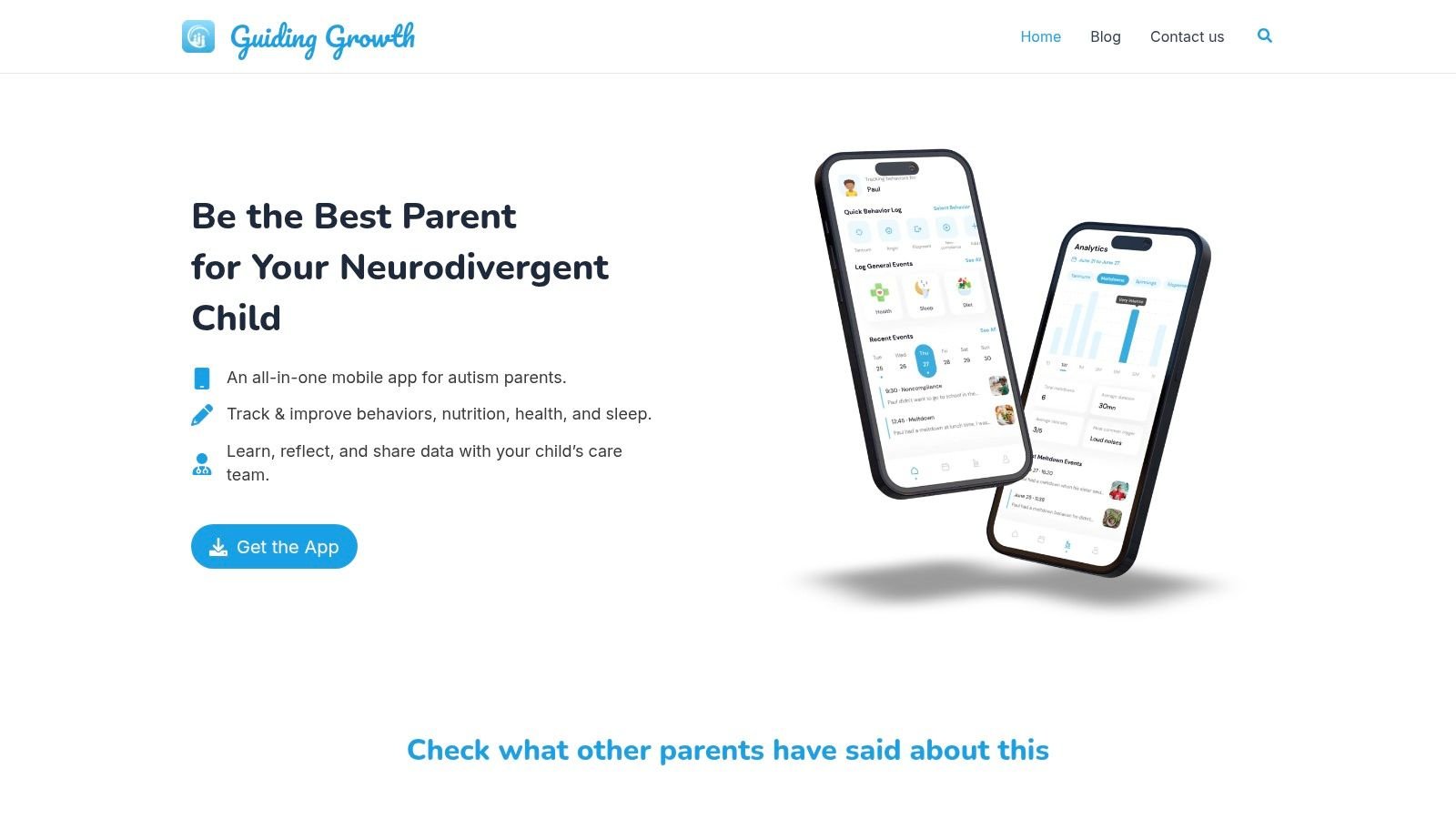
Guiding Growth is built for autistic and neurodivergent children. It logs medications and supplements with schedules and push reminders, inside the same profile as behavior, sleep, meals, mood, therapy, and specialist visits. You're not copying a dose from one app into notes in another. The timeline is the record.
This screenshot shows how medication sits inside a broader daily view instead of standing alone.
Voice Logging for Busy Hands
Forms fail when you're holding a cup, a backpack, and a child's hand. With Quick Log by voice, you talk through the day as you'd tell a friend. The AI extracts organized entries for medications, behavior, sleep, meals, and mood, even across several children in one recording. You review what was captured, fix anything that's off, and save. It takes about a minute.
Say you record one note after drop-off. Morning dose given at home, poor sleep last night, two meltdowns before school. Weeks later, you don't have to rely on memory. You can look at that cluster in context.
Profiles, Permissions, and Patterns
Each child has a separate profile, history, and analytics. You can invite co-parents, caregivers, therapists, and educators as collaborators, with per-person permissions for viewing events, adding events, and managing the profile. A sitter who only needs to confirm an evening dose doesn't need the same access as a co-parent who manages the schedule.
The analytics show behavior frequency, common triggers, and time-of-day clustering. That lets you ask a calmer, more specific question at a review. Did sleep shift after a medication change? Do meltdowns cluster on days a dose was late? You're spotting patterns to discuss, not drawing medical conclusions on your own.
For meetings, Smart Summaries let you choose a date range and event types, then export a PDF for an IEP, 504 review, or specialist visit. That beats arriving with scattered screenshots.
The two tools can complement each other. The Apple iPhone guide to tracking medications documents scheduled notifications, a 30-minute follow-up if a dose remains unlogged, "Taken" or "Skipped" logging from the notification, and a "Remind Me in 10 Minutes" option on Apple Watch. Apple Health can serve as the dose-level layer. A whole-child platform places those medication events alongside sleep, meals, behavior, therapy, and mood for a fuller timeline.
Limits matter here too. Guiding Growth doesn't provide medical advice, doesn't replace your prescriber or pharmacist, and doesn't describe drug-interaction checks. If interaction screening is your main need, use a pharmacist-verified source and discuss concerns directly with your care team.
How the Options Compare on Each Criterion
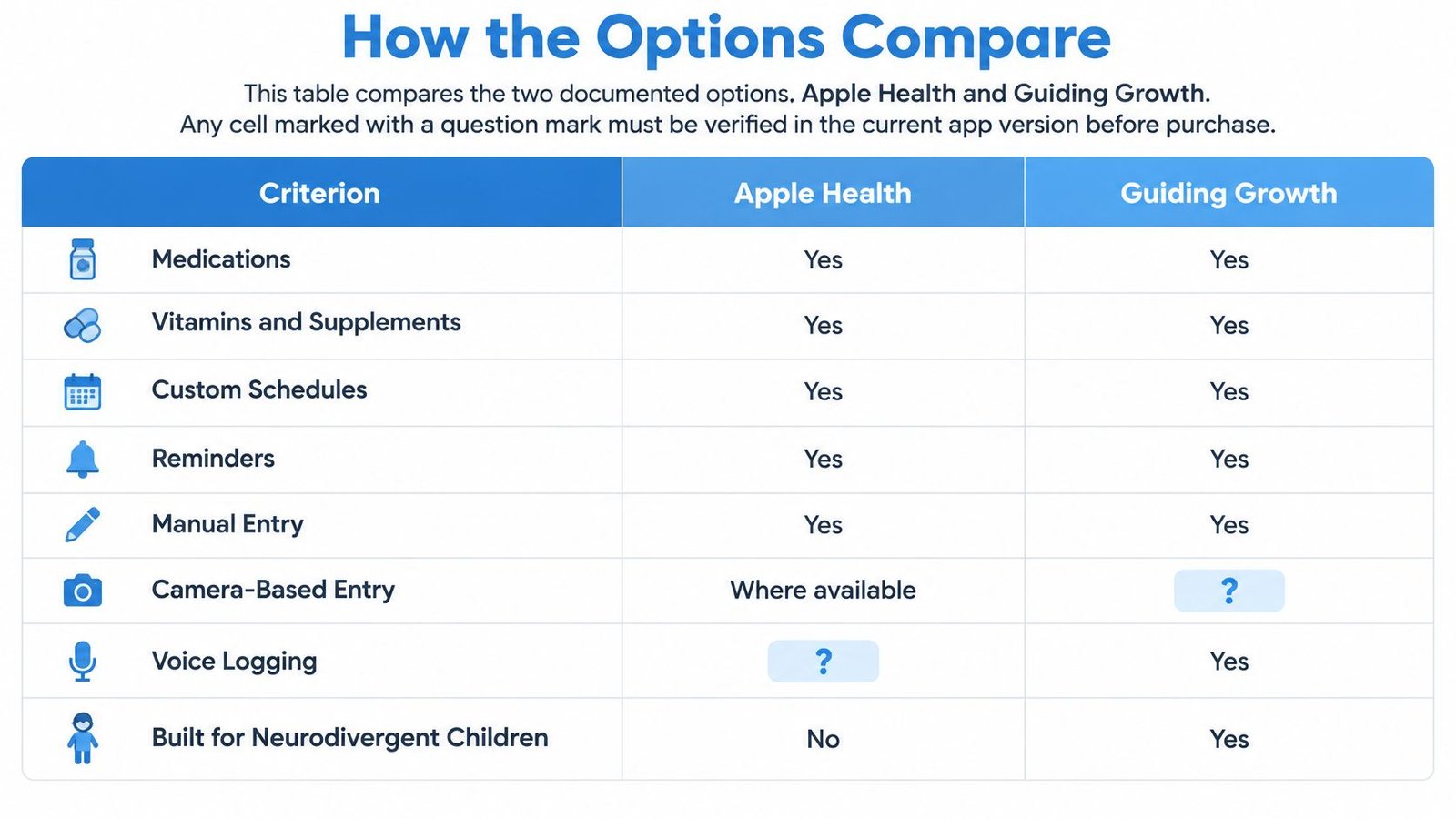
A useful comparison separates what an app documents from what it does not describe. Apple Health focuses on medication scheduling and dose logs. Guiding Growth places medication events within a child's broader daily record, including behavior, sleep, and therapy. The table summarizes the stated features, so treat undocumented capabilities as unknown rather than assuming they are available.
This infographic gives you a side-by-side reference while you compare the options.
| Criterion | Apple Health | Guiding Growth |
|---|---|---|
| Scheduled dose reminders | Yes, custom schedules | Yes, with push reminders |
| Follow-up if a dose is unlogged | Yes, 30 minutes later | Not described in product materials |
| Critical Alerts through mute or Focus | Yes, documented | Not described in product materials |
| Taken or Skipped logging | Yes, from notification or Apple Watch | Medication events can be logged in the child's timeline |
| Drug interaction information | Interaction information, with levels listed as Moderate, Serious, or Critical | No drug-interaction checks are described; the app does not provide medical advice |
| Shared access for several caregivers | Not documented | The app supports a shared view for caregivers involved in the child's care |
| Behavior, sleep and therapy context | No | Yes, medication events can sit alongside other daily entries |
| Voice logging | No | Yes, voice entries can include multiple children |
| Export | Not described in medication documentation | Smart Summaries export as PDF for meetings |
| Processing location | On device for the medication feature | Not described in product materials |
The Three Rows That Decide for Most Families
Follow-up and Critical Alerts show what happens after a dose is still unlogged or a notification is missed. A reminder can prompt an adult to check, but it cannot prove that the medication was given. The logged event is a record, not independent verification. If timing is a concern for your child, check what the app does when an alert goes unanswered and whether the alert behaves as expected on your device.
Shared access matters when several adults help with medication. A second caregiver may need to see the schedule and record a dose, while another adult may only need to know that a dose was logged. Check what each person can view and change before choosing a shared setup.
Context shows whether medication events can be considered alongside changes in sleep, behavior, meals, or therapy. When a clinician asks whether sleep or meltdowns shifted after a dose adjustment, a timeline with those daily records can give the family a clearer account to discuss. It helps organize observations; it does not establish that a medication caused a change.
Apple Health also provides medication interaction information. Apple's medication support page describes interaction categories as Moderate, Serious, or Critical. Availability can vary by location, so check whether the feature is available where you live. A missing alert does not prove that no interaction exists. Ask a pharmacist about the full medication list, including over-the-counter products and supplements.
The evidence on adherence also highlights the practical value of keeping records consistently. A 2020 systematic review and meta-analysis in the Journal of Managed Care and Specialty Pharmacy evaluated 14 studies involving 1,785 adults with chronic diseases and reported a pooled adherence effect of Cohen's d = 0.40, 95% confidence interval 0.27 to 0.52, P < 0.001. The review rated the overall evidence as low quality. Its findings concern adults, not children, and do not establish what happens when a caregiver records doses. For families, the practical point is straightforward: a tracking routine only helps if it is manageable enough to keep using.
Run a Five-Minute Test Before You Decide
- Set one medication: Turn on a reminder and follow-up, then check what happens when a dose remains unlogged.
- Log a skip: Confirm the history marks it clearly and retains the time.
- Invite a second caregiver: Check what that person can view and add.
- Check undocumented features: Look for follow-up, Critical Alerts, and export in the current version, and note what is available.
Use the same checks with any dedicated reminder app on your shortlist. A brief hands-on test can show whether the app fits your household better than store reviews alone.
Who Sees Your Child's Medication Data
A medication record is useful to a family only when the right adults can see and update it. Before checking whether an app syncs with Apple Health, ask who can see your child's medication data, what they can see, and how you can revoke access.
Could a spouse see the schedule without reading every note? Could a grandparent confirm a dose without managing the profile? Could a school nurse receive the midday plan without seeing therapy history? And when a sitter no longer helps your family, can you remove their access?
Apple's approach keeps medication-feature processing on the device, according to Apple's Health privacy documentation. Camera-based entry and interaction alerts depend on jurisdiction. On-device processing can limit one kind of exposure, but it does not create a shared family record. The information still sits within one person's device and account habits.
A Privacy Checklist You Can Actually Test
- Encryption claims: Look for plain language about how data is protected. Before entering a full medication list, ask the app provider what information it stores and where. A guide to privacy-focused app design can help frame the questions.
- Account deletion and export: Check that you can export your data and delete the account. Test export before you need the information for a new clinician.
- Lock-screen exposure: See whether a medication name appears on a locked iPhone, where siblings, classmates, or visitors might read it.
- Permission granularity: Check whether the app separates viewing, adding, and managing access. A helper who gives an occasional dose may need to record it, not control the profile.
- Shared-device risk: Review family iPads and grandparents' phones. If an app remains logged in, anyone using that device may be able to open it.
- Advertising use: Look for a clear statement on whether medication data is used for ads or shared with advertisers. If the policy is unclear, do not assume the data is excluded.
Sharing brings a practical trade-off. Wider access can make school handoffs and weekend visits easier, while giving more people access to sensitive information. A useful middle ground is view-only access for occasional helpers, with broader permissions reserved for adults who manage doses regularly.
Caregivers who help informally may need access, yet their accounts can be easy to overlook. Set a recurring reminder to review collaborators and remove anyone who no longer gives doses. A reminder can prompt that review, but only the access settings determine who can see the record.
Choose the Setup That Fits Your Household
Start with the simplest setup that matches who logs doses. Add a whole-child platform when medication must sit beside behavior, sleep, therapy, and school information. Complexity you don't need becomes friction. Friction becomes missed logs.
| Household situation | Start with | Add when |
|---|---|---|
| One parent, one child, one or two daily medications | Apple Health medication feature | Behavior or sleep patterns need tracking beside doses |
| Co-parents in two homes | Whole-child platform with per-person permissions | Both homes must log doses and see the same schedule |
| Grandparent or sitter gives a dose | Whole-child platform with a caregiver role | The helper needs to record a dose they gave |
| School gives a midday dose | Whole-child platform with an educator collaborator | School staff must confirm the midday dose in the shared record |
| Several medications plus as-needed doses | Apple Health or a reminder app with verified history | A clinician needs an adherence history with skipped-dose reasons |
| Teen starting self-management | Apple Health on the teen's own iPhone | A parent needs visibility, with consent agreed in advance |
School dosing deserves its own plan because handoffs fail in predictable ways. Names, times, storage, and who confirms the dose should be written down, and a practical school medication plan in five steps can help you align home and school records before the first midday dose is due.
Next Steps in Order
- List everything: Write down every medication, supplement, and as-needed dose, with dose and schedule, from the current prescription labels.
- Set up and test: Add reminders in your chosen app and run the five-minute test with mute and Focus active.
- Grant narrow access: Decide who needs view access and who needs add access. Give the narrowest permission that lets each person do their job.
- Run a two-week trial: Review every missed or skipped dose. Look for patterns tied to time, place, or a specific handoff.
- Export for appointments: Print or export the record and bring it to the next visit, instead of reconstructing two weeks from memory in the waiting room.
If you're already logging behavior, sleep, and therapy in Guiding Growth, adding medications there gives your child's care team one timeline. Summaries stay ready for IEP or 504 meetings, and a new specialist sees doses beside the patterns you're trying to explain.
Bring the record, not a reconstruction. Clinicians make better decisions from dated logs than from a tired parent's best recall.
Keep one boundary firm. Dosing questions, interaction worries, and decisions to change or stop a medication go to the prescriber or pharmacist. Your best medication tracker app for iPhone supports that conversation with clean data. It doesn't replace it.
If medication is only one part of your child's day, Guiding Growth lets you log doses and supplements alongside behavior, sleep, meals, and therapy, share access with per-person permissions, and export meeting-ready summaries for clinicians and school teams. Set up one child's profile, add the current medication schedule, and run your first week with voice logging to see whether a single timeline makes appointments calmer and handoffs clearer.