It's Tuesday evening. You've just logged a meltdown, added a new medication note, and sent the update to a co-parent, a therapist, and a grandparent from your phone before dinner gets cold. In that moment, the question isn't whether the app is convenient, it's where that information goes, who can see it, and whether it stays protected if something goes wrong.
For families raising autistic or neurodivergent kids, that question matters because the data itself is deeply personal. Behavior notes, medication changes, school messages, therapy observations, sleep patterns, and nutrition details can reveal far more than a single appointment ever would. A HIPAA compliant app gives parents a way to treat that information with the same seriousness they'd expect from a clinic, because a child's most vulnerable moments deserve more than a casual note-taking tool.
That doesn't mean every family app is legally under HIPAA. It does mean parents should understand the protections HIPAA represents, because the same habits that keep clinical data safe, limited access, traceable sharing, encryption, and good vendor discipline, are exactly the habits that keep caregiving data from drifting into the wrong places. In practice, choosing a thoughtful app is part of protecting your child's dignity, your family's trust, and the long-term privacy of records that may follow them for years.
Table of Contents
- Why Parents of Autistic Kids Should Care About HIPAA
- What Makes an App HIPAA Compliant in Plain English
- The Three HIPAA Rules Every Caregiving App Must Follow
- Administrative, Physical, and Technical Safeguards Explained
- How AI Voice Logging Changes the Compliance Picture
- A Parent's Checklist for Evaluating Any Caregiving App
- What HIPAA Does Not Promise and Where Marketing Hides
- Bringing It All Together for Your Family
Why Parents of Autistic Kids Should Care About HIPAA
A parent's job is already a hundred tiny decisions a day. One of the hardest is deciding whether a behavior note should live in a random text thread, a paper notebook, or an app that other caregivers can open. When the note includes a meltdown trigger, a medication change, or a school concern, it stops being ordinary family chatter and starts looking a lot like sensitive health information.
That sensitivity is why HIPAA belongs in the conversation. The U.S. Office for Civil Rights had received 370,578 investigated privacy-rule complaints by October 31, 2024, with 99% resolved and 3,744 still open according to HHS's published enforcement data, and it received 30,256 new HIPAA complaints in calendar year 2024 while carrying over 2,955 open complaints from 2023 (HHS OCR data). Those numbers show that HIPAA isn't some dusty rule set sitting on a shelf, it's an active oversight system with a long memory.
Why family records deserve the same care
Autism caregiving data can include diagnoses, therapy progress, medication reactions, communication patterns, school behavior notes, and sleep or nutrition changes. In plain language, that's the kind of information you wouldn't want forwarded casually or exposed through a weak login. A good app should help you keep it organized without making it easier to leak.
Practical rule: if you would hesitate to paste a note into a group text, it probably belongs in a tool with stronger access controls than a chat app.
This is also where family context matters. A grandparent may need to know about bedtime routines. A therapist may need behavior logs. A co-parent may need medication timing. Those are different audiences, and the app should let you share differently with each one instead of forcing one giant all-access feed.
Families who choose carefully are doing more than shopping for convenience. They're deciding whether their child's history stays inside a controlled system or ends up scattered across screenshots, forwarded messages, and unsecured devices. That choice shapes how safely the family can collaborate later, especially when school staff, clinicians, and in-home caregivers all need a piece of the picture.
What Makes an App HIPAA Compliant in Plain English
HIPAA gets easier when you stop treating it like a mystery acronym and start treating it like a simple question. Who created the data, who stores it, who can see it, and who is responsible if it's exposed? If an app creates, receives, maintains, or sends electronic protected health information, or ePHI, then it needs to handle that information under HIPAA's rules when it sits in a covered-entity or business-associate workflow (AccountableHQ).
For a parent, the easiest analogy is a locked diary with assigned keys. A behavior log about a meltdown isn't just a “note.” If it includes health context, therapy details, medication reactions, or other identifiable information, it can sit inside the same privacy conversation as a medical chart. That's why a serious caregiving app should behave like a system built for controlled sharing, not like a casual journal.
The gray zone most families miss
A lot of parent-led autism apps live outside HIPAA because they aren't used inside a provider or payer workflow. HHS says mobile health apps should be checked first for whether they collect individually identifiable health information and whether that information falls under HIPAA's definitions, and it also notes the important nuance that information created or stored on personal phones, tablets, or fitness trackers isn't automatically protected by HIPAA (HHS health app guidance). That means the law may not cover every family app, even when the data is extremely sensitive.
The legal label matters less than the protection level. If a parent app isn't technically in HIPAA scope, it still should act like it is when handling sensitive child data.
That's the best way to think about a trustworthy hipaa compliant app for caregiving. It isn't only about checking a legal box. It's about applying HIPAA-grade design, limited access, logging, encryption, and vendor discipline so families aren't forced to guess whether a note about medication or a behavior pattern is safe.
For readers who want to see how this looks in a symptom-tracking workflow, the logic is similar to what's outlined in this symptoms tracking app overview. The core idea is simple, the app should make sensitive tracking easier without making sensitive sharing sloppy.
The Three HIPAA Rules Every Caregiving App Must Follow
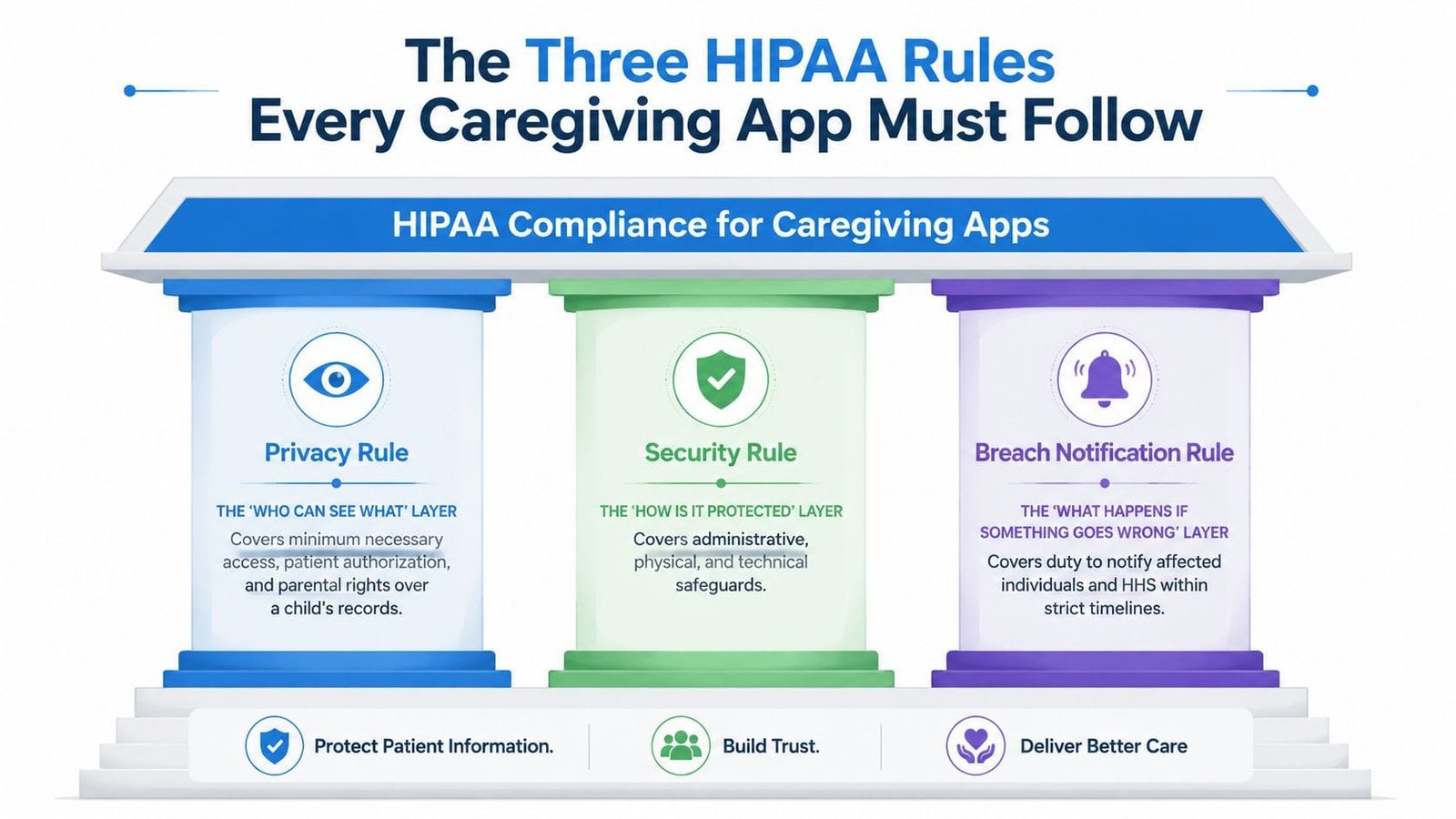
HIPAA isn't one rule. It's a structure. If a caregiving app touches ePHI, the family should care about three separate layers, because each one answers a different question about the data.
Privacy, Security, and breach response
The Privacy Rule is the “who can see what” layer. It governs access, authorization, and how much information should be shared for a particular purpose. In a family context, that means a behavior chart can be visible to a co-parent and a therapist, while school staff only get the portion they need.
The Security Rule is the “how is it protected” layer. HIPAA's technical safeguards show up here, including unique user identification, access control, audit controls, integrity, person authentication, and transmission security under 45 CFR §164.312 (technical safeguard overview). In plain language, no shared logins, no mystery access, and no sending sensitive notes over unprotected channels.
The Breach Notification Rule is the “what happens if something goes wrong” layer. If a vendor or app has a serious exposure, families need a clear process for notification and response, not a vague promise that “we take privacy seriously.”
What that looks like in daily caregiving
A therapist might need a week of meltdown logs, but not every family message. A school team might need context around transitions, not medication side effects in full detail. A parent might want a grandparent to see sleep trends while keeping private care notes restricted. Those are all Privacy Rule questions in practical form.
The security side matters just as much. A child's therapy history shouldn't live behind a shared password handed around the family. It should sit behind individual accounts, traceable access, and encrypted transport. The app should also make it possible to tell who viewed what, because families deserve visibility, not just a promise.
Key point: the best caregiving apps make sharing intentional. They don't treat privacy as a hidden setting buried three menus deep.
If an app claims compliance, ask which of these three rules it supports. If the answer only mentions encryption, that's not enough. If it only mentions a legal agreement, that's not enough either. Real compliance means the app's sharing model, storage model, and incident process all point in the same direction, which is exactly why the design of a family app matters long before a breach ever happens.
For a closer look at therapy-note handling in a family workflow, the structure maps well to the way a therapy session notes feature should work inside a caregiver app.
Administrative, Physical, and Technical Safeguards Explained
The Security Rule sounds abstract until you split it into layers. A parent doesn't need to memorize legal phrasing. They need to know whether the app has guardrails around people, devices, and software, because each one can expose a child's records in a different way.
The people layer
Administrative safeguards cover governance. That means risk assessments, workforce training, role-based access, vendor management, and Business Associate Agreements with every service that touches PHI. If a vendor stores the data, sends notifications, processes analytics, or handles support messages, the family should want to know that the relationship is documented, not improvised (governance overview).
This is the layer most app pages skip because it's not flashy. But it's the layer that stops “helpful” staff from seeing too much, or outside vendors from becoming accidental weak points. If a product can't explain who has access behind the scenes, families should be cautious.
The device and system layer
Physical safeguards cover the environment where data lives, including device security, access to servers, and the protection of storage systems. Families may not see the server room, but they do see the result when an app forces screen locks, supports secure devices, and prevents casual access to sensitive notes.
Technical safeguards are the most visible to users. Under HIPAA, apps should use unique user IDs, access controls, audit controls, integrity protections, person authentication, and transmission security (45 CFR §164.312 summary). In family terms, that means every caregiver has their own login, the app records who viewed or changed a note, and data moves across the internet in encrypted form.
A good way to evaluate an app is to ask what each layer enables. Administrative safeguards let you trust the vendor relationship. Physical safeguards reduce the damage from stolen devices or insecure infrastructure. Technical safeguards make the app itself behave like a controlled record system instead of a shared notebook.
The parent-facing benefit is simple. You can tell exactly which caregiver viewed a therapy note last week, and you can remove access when a role changes. That kind of visibility turns compliance into something families can feel, because it reduces confusion as much as it reduces risk.
How AI Voice Logging Changes the Compliance Picture
A voice note sounds harmless until you trace what happens next. You speak into the app after a hard afternoon. The app records audio, turns it into text, stores the transcript, and may create internal representations for search or AI features. If a third-party model API touches any of that content, you've created more than one data flow, and each flow needs a privacy decision.
Why voice notes need extra scrutiny
That's where AI changes the conversation. A simple behavior log is one thing. An AI-assisted log can produce transcripts, summaries, embeddings, and metadata that live in separate places. If those outputs are retained longer than the raw note, or sent to another vendor for processing, the privacy risk grows with each handoff.
A HIPAA-grade app should map every PHI flow across audio files, transcripts, databases, backups, and third-party integrations. It should also keep monitoring and logging part of the product, not an afterthought. Recent app-development guidance has shifted toward continuous risk assessment and stronger vendor control for exactly this reason, because the hardest problems usually appear after the first feature launch (AI-focused compliance guidance).
What good architecture looks like
A practical mobile setup uses AES-256 for data at rest and TLS 1.2+ for data in transit, including databases, backups, and file storage (encryption guidance). Security works better when keys stay outside the app in a dedicated key-management service, because storing them beside PHI weakens the protection layer.
Practical rule: if a voice note becomes a transcript, treat the transcript as the real sensitive record, not just a temporary byproduct.
That matters for parents because voice logging exists to reduce friction, not create hidden leakage. A well-designed caregiving app should convert spoken observations into structured records without sending raw audio into training pipelines or letting vendor APIs keep more than they need. It should also make sure every vendor that touches the data has the right contractual and technical controls in place.
When AI is built inside a controlled environment, it can support family caregiving without turning every note into a privacy gamble. The difference isn't whether the app uses AI. The difference is whether the plumbing respects the data all the way through.
A Parent's Checklist for Evaluating Any Caregiving App
The easiest way to judge a caregiving app is to ask direct questions before you upload anything sensitive. A polished homepage can hide a weak data model, but it's much harder to hide bad answers when you ask about scope, access, storage, vendors, and incident response.
Five buckets to ask about
- Data scope: Ask, “What exactly do you collect, and why do you need it?” A real answer names the data types and the purpose. A weak answer stays vague or says “to improve experience” without explaining the health context.
- Access control: Ask, “Who can see my child's data, and how do I remove access?” You want individual accounts, role-based permissions, and revocation that works.
- Storage and transit: Ask, “How is data encrypted at rest and in transit, and how are keys managed?” The answer should mention encryption, backups, and key separation, not just “industry standard security.”
- AI and vendor flows: Ask, “Which outside services touch the data, and do you have signed BAAs where needed?” Hidden risk often lives here, especially with analytics, error tracking, and AI tools. If you want a model for what a thorough parent checklist looks like, the CloudOrbis Inc. HIPAA compliance checklist is a useful companion reference.
- Incident response: Ask, “How will I know if there's a breach, and what happens next?” You want a clear notification process, not a generic promise of vigilance.
A good vendor can answer these questions without dancing around them. A weak vendor relies on marketing phrases like “bank-level security” while dodging specifics about logs, retention, or subprocessors.
A quick self-audit you can do today
Open the app you already use and check three things. First, can you see distinct caregiver roles? Second, can you find a privacy policy that talks plainly about data sharing and retention? Third, can you tell whether notifications, AI tools, or support tools might touch your child's records? If the answers are hard to find, the app is asking for trust without earning it.
That's the difference between buying a product and evaluating a system. Parents don't need to become compliance experts. They just need enough questions to separate real safeguards from decorative language.
What HIPAA Does Not Promise and Where Marketing Hides
HIPAA can make an app safer, but it can't make it perfect. It doesn't guarantee the product is bug-free, it doesn't guarantee every AI output is clinically correct, and it doesn't promise that data will never be breached. It sets a floor for handling sensitive information, not a ceiling for quality.
That distinction matters because marketing often blurs it. A homepage can say “HIPAA-grade encryption” and still leave you wondering whether the vendor signed the right agreements with every service that touches the data. Secure messaging sounds reassuring until you learn there are no useful audit logs. An AI companion sounds helpful until the app never tells you how long transcripts are retained or whether they're used to train models.
Red flags families should notice
A claim is weaker when it is broad and unsupported. If a product talks about privacy but won't name its vendors, that's a problem. If it says the data is secure but can't explain access controls or account revocation, that's a problem too.
The most useful signals are boring on purpose. Published security policies, transparent subprocessor lists, outside audits, and clear breach notification commitments say more than fancy product language. Families should also pay attention to whether the app explains how support staff, analytics tools, and AI features are handled, because those are common places where sensitive data leaks into systems people didn't expect.
A compliant app doesn't just promise safety. It shows its work.
The other limitation is time. Compliance can fade if a vendor changes tools, adds features, or expands integrations without revisiting the controls around them. That's why ongoing review matters more than a one-time badge. Parents need products that treat privacy as a living commitment, not a launch-day announcement.
Bringing It All Together for Your Family
A strong caregiving app should make three things easier at the same time. It should help you decide who sees what, it should protect how the information moves and stores, and it should give you a clear path if something ever goes wrong. When those pieces work together, the app becomes more than a place to dump notes, it becomes a reliable support system for daily life.
That matters because the best family data isn't scattered. It's organized. A good system lets you compare behavior patterns, sleep changes, nutrition sensitivities, medication reactions, and therapy progress without turning every update into a search mission. That's also why structured records are so useful for families who need to keep medical details, therapy notes, and home observations in one place, as the logic behind a how to organize medical records workflow makes clear.
For parents of autistic kids, the payoff of compliance is clarity. Role-based sharing lowers the risk of oversharing. Audit trails reduce confusion about who changed what. Encrypted storage makes it easier to trust that sensitive notes aren't drifting around unsecured devices. And when voice logging or AI assistance is built inside that same protective system, the app can save time without sacrificing privacy.
A HIPAA-grade app is not just safer, it's more useful, because trustworthy data infrastructure makes the information dependable. That's what turns scattered observations into patterns you can act on with confidence.
If you're ready to see how a caregiving app can bring behavior logging, sharing, and privacy together in one place, visit Guiding Growth and explore how it supports families who need clearer records without giving up control. It's built for parents who want practical tools, better collaboration, and a calmer way to manage the details that matter every day.