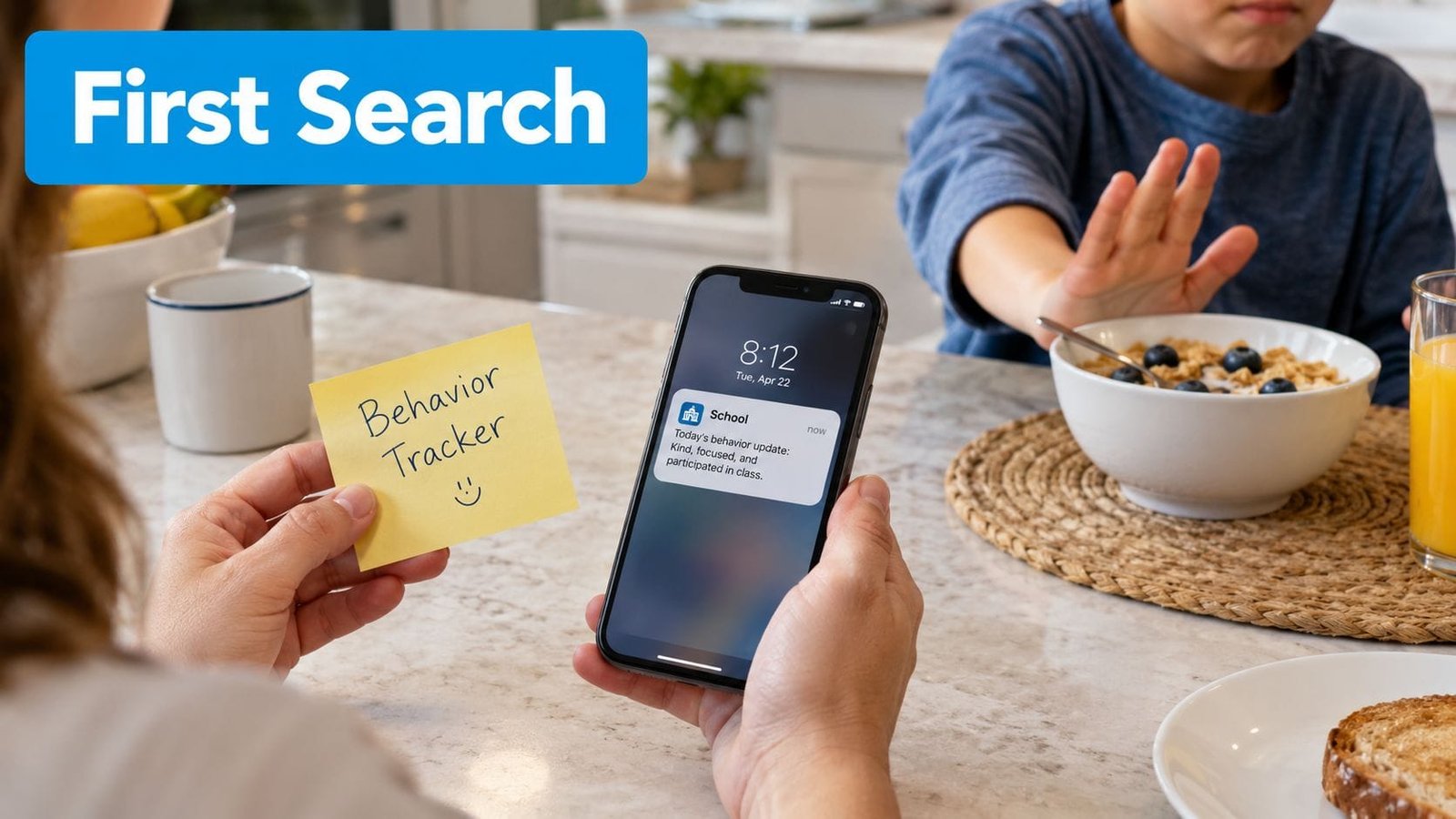
By 7:10 on a weekday morning, the kitchen may already feel like a command center. A sticky note holds yesterday's behavior-tracking details, your phone buzzes with a school update, and your child is overwhelmed because the cereal is in the wrong bowl. You're trying to remember what happened before bedtime, explain it to a co-parent, and decide whether the therapist needs to know, all while helping everyone leave the house.
That's the moment many parents begin searching for apps for autism. The search usually starts with exhaustion, not a carefully designed care plan. The challenge isn't finding an app with attractive buttons. It's choosing tools that fit your child, protect sensitive information, and help the adults around them work from the same picture.
By 2018, nearly 700 autism apps for smartphones and tablets were available, reflecting how quickly mobile software became a major support channel for families and clinicians looking for portable options beyond clinic-only interventions. Research has also become more rigorous. A 2021 meta-analysis found a small positive overall effect, while a 2024 meta-analysis of 33 studies and 1,285 participants reported Hedges' g = 0.62, with a 95% confidence interval of 0.36 to 0.88 and p < 0.001, across outcomes (the review in PMC). Apps can help, but only when they become part of a thoughtful system rather than another source of alerts.
Table of Contents
- The Moment Parents Start Looking for Apps
- The Main Categories of Apps for Autism
- Five Questions to Ask Before You Download
- Why One Connected Hub Beats Five Point Solutions
- Choosing Apps Versus Designing a Care Plan
- Fitting Apps Into Real Weekday Routines
- Privacy, Collaboration, and Long-Term Reflection
The Moment Parents Start Looking for Apps
The sticky note has a sentence written in a hurry: “Upset after bath, calmed with headphones.” You meant to add the time, what happened before the bath, and how long the distress lasted, but the school bus arrived before you could finish. Later, your phone shows a message from school asking whether anything unusual happened at home.
You search your memory. Sleep was poor, dinner was rushed, and there was a change in the evening routine. You think those details might matter, but they're scattered across a notebook, text messages, and your recollection. When the therapist asks about patterns, you find yourself giving an honest answer that still feels incomplete: “I'm not sure. It seems to happen around transitions.”
The problem isn't effort
Parents often assume that better tracking requires remembering more. In practice, the opposite is usually more helpful. A usable tool reduces the number of details you have to hold in your head by giving you a consistent place to record observations as they happen.
The CDC reported in 2025 that about 1 in 31 children aged 8 years, or 3.2%, had been identified with ASD in its ADDM Network surveillance estimates (CDC autism data and research). That prevalence helps explain why support software has become relevant to mainstream family care planning. More families are coordinating school communication, appointments, sleep, medication, routines, and treatment notes over long periods.
Practical rule: An app should make the next caregiving decision easier, not merely create a longer record.
Move from reaction to intention
Start by naming the friction you want to reduce. Maybe you need a communication aid during meals, a visual routine for getting dressed, or a quick way to show a clinician what happens before a shutdown. Those are different jobs, and they may require different tools.
A small, intentional app setup can change the morning. A parent records the trigger while it's fresh, a co-parent sees the same note, and a therapist can discuss the pattern without reconstructing the week from memory. The goal isn't to digitize every part of family life. It's to remove the scattered handoffs that make daily care feel harder than it already is.
The Main Categories of Apps for Autism
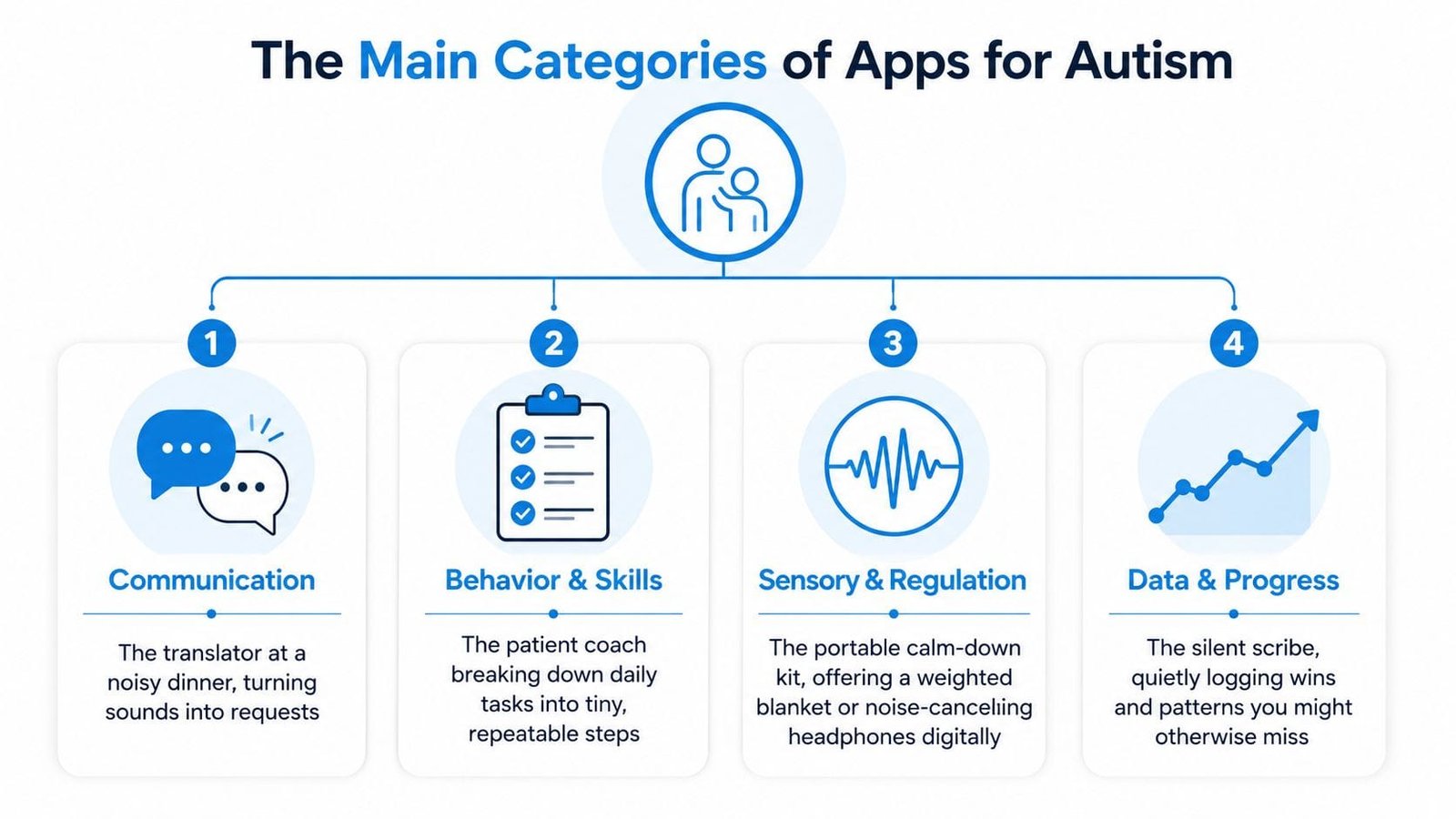
The easiest way to understand this field is to match each app category to a daily job. Families don't need every type. Many use two or three, depending on communication needs, routines, sensory regulation, and the kind of information their care team needs.
Communication tools act like a translator
A communication app can help a child express a request, refusal, choice, feeling, or question through pictures, text, symbols, or speech output. Think of it as a translator at a noisy dinner table. Instead of relying on speech alone, the child may tap a picture for “drink,” combine symbols into a phrase, or select an option from a visual choice board.
The important question is whether the system matches the child's current access method. Large targets, predictable navigation, switch access, and vocabulary that reflects real life matter more than a long feature list. A communication app should also be used consistently by the adults around the child, not brought out only when communication becomes difficult.
Behavior and skills apps provide a patient log and coach
Behavior-tracking apps record what happened before an event, what the behavior looked like, and what followed. That might include a transition refusal, hand flapping, echolalia, a shutdown, or a successful request. Over time, the record can help adults discuss patterns with a qualified professional instead of relying only on memory.
Skills apps break a task into repeatable steps. Brushing teeth, packing a bag, or waiting for a preferred activity may become a sequence the child can practice with visual prompts and feedback.
Sensory and regulation tools offer a portable calm-down kit
These tools may include visual timers, breathing prompts, calming sound options, or simple regulation activities. They're most useful when introduced during calm periods, so the child already knows how to access them before distress peaks. A screen-based tool can support regulation, but it can't replace an individualized sensory plan or professional guidance.
Routine and data tools coordinate the household
Routine apps sequence morning steps, transitions, meals, and bedtime. Data tools capture observations, sleep, medication, appointments, and progress notes. Together, they can function like a household conductor and a silent scribe.
A family that's coordinating care across home, school, and therapy may also need to think about safety outside the home. A separate family location monitoring guide can help parents evaluate location-sharing tools without confusing them with communication, regulation, or care-tracking apps.
For a broader look at tools for children with different support needs, see the apps for special needs resource. The useful distinction is simple: choose an app because it serves a specific purpose in your child's day, not because its category sounds all-encompassing.
Five Questions to Ask Before You Download
An app store description tells you what a product does. It doesn't tell you whether your child can use it comfortably, whether your family can trust its data practices, or whether the tool will remain useful after the first week.
A practical review of mobile applications for autism found only 7 randomized controlled trials among 1,100 screened studies, showing that the evidence base remains early-stage and selective. In two of those trials, visual and fine motor outcomes on the Mullen Scales of Early Learning showed statistically significant standardized mean differences of 0.41 on both subscales, with no detected heterogeneity or publication bias (the systematic review on PubMed). That doesn't make every app effective. It means parents should distinguish tested intervention design from polished presentation.
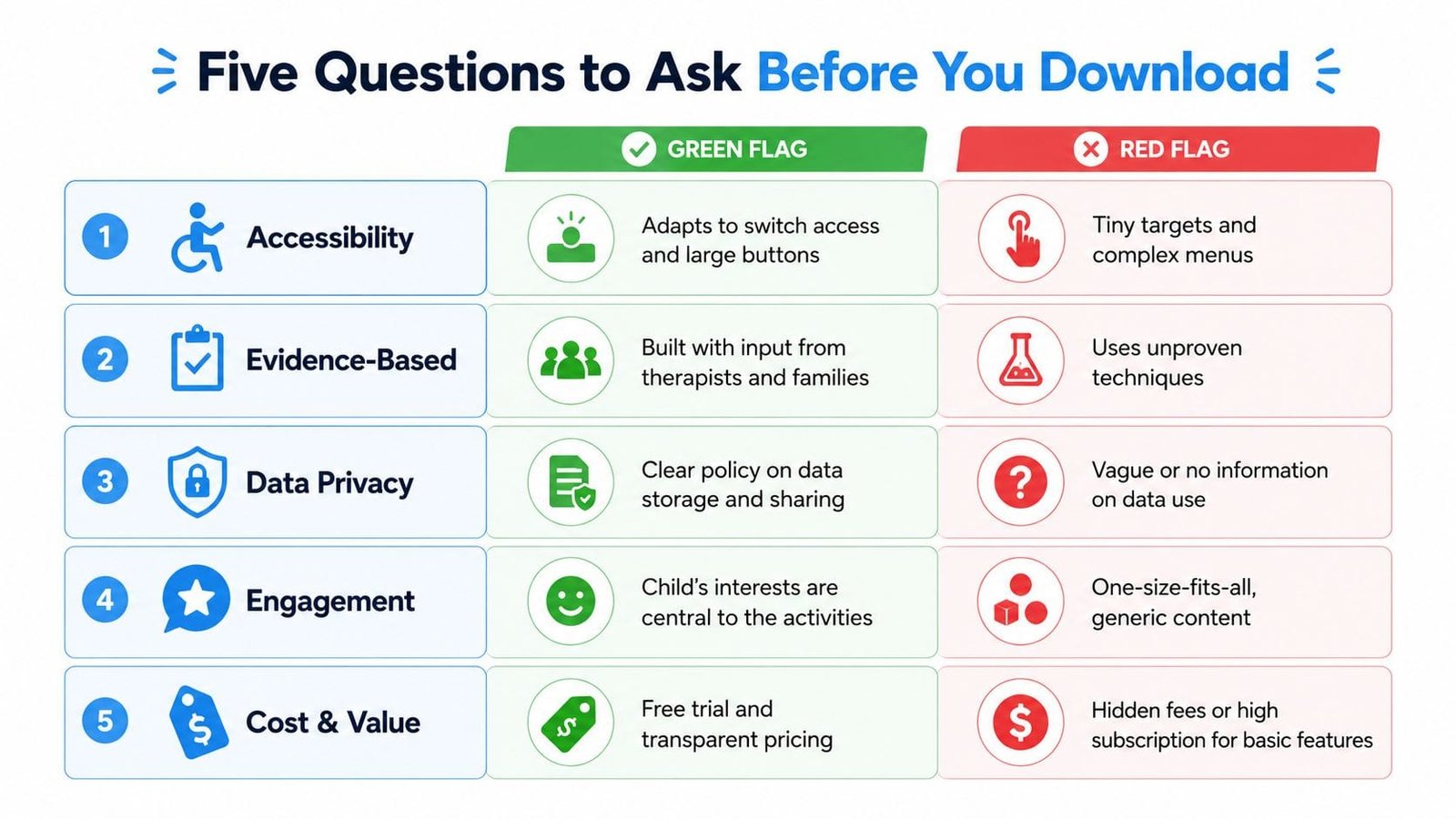
Can my child access it?
Look beyond age labels. Check whether the app supports your child's motor control, visual needs, attention style, communication method, and sensory preferences.
- Green flag: Large buttons, adjustable visuals, switch access, and a simple route back to the home screen.
- Red flag: Tiny targets, complex menus, fast animations, and instructions that depend on reading or fine motor precision.
What evidence supports the design?
A broader review identified 10 randomized controlled trials, with 6 showing significant intervention effects and 2 producing mixed results (the mobile technology review in PMC). The lesson is not to demand a research paper for every timer or checklist. It's to ask what the app is designed to change and whether its methods resemble an evidence-informed practice.
- Green flag: Clear explanation of the skill, professional input, and a description of how practice and feedback work.
- Red flag: Testimonials presented as proof, vague promises, or unproven techniques described as universal solutions.
Who owns and sees the data?
Read the privacy policy before entering behavior notes, health details, school information, or recordings. Look for plain explanations of storage, sharing, retention, deletion, and third-party access.
- Green flag: Clear data controls, understandable sharing settings, and a way to delete or retrieve records.
- Red flag: Vague language, ad networks, unclear ownership, or no practical deletion process.
Can caregivers collaborate?
The app should reflect how care happens. Can a co-parent, grandparent, teacher, or therapist see the information they need without receiving a stream of screenshots?
- Green flag: Role-based permissions, shared notes, and an export or report function.
- Red flag: One shared password, no control over viewers, or information trapped on one person's phone.
Will it still fit later?
Your child's needs can change. A tool that works for a visual morning routine may become unnecessary, while a behavior log may become more valuable during a school or therapy transition.
- Green flag: Transparent pricing, a trial where appropriate, and a clear path to export family data.
- Red flag: Essential records locked behind an ongoing subscription with no exit path or hidden charges.
Why One Connected Hub Beats Five Point Solutions
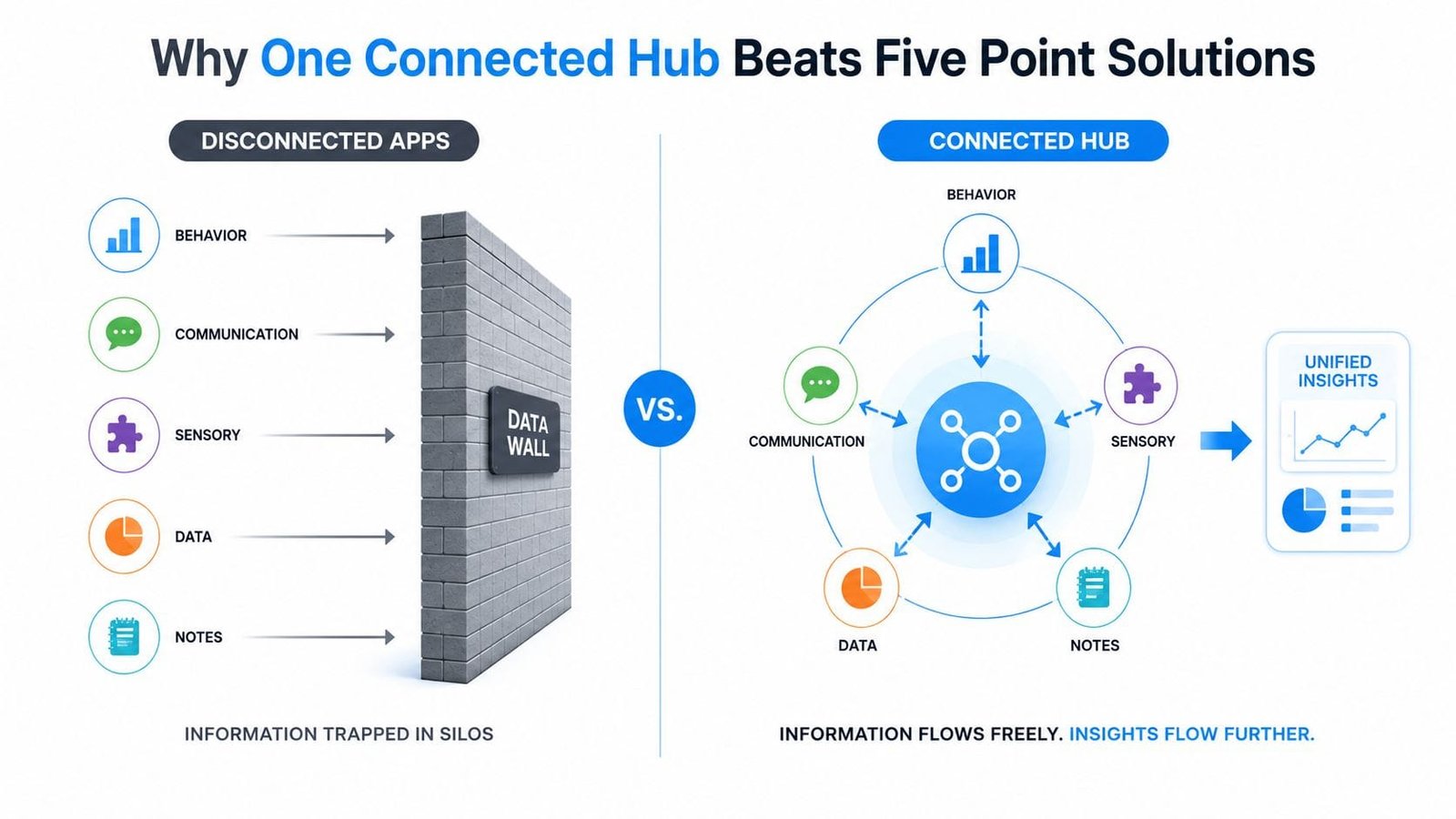
More apps can look like more support. A communication tool sits beside a routine tool, which sits beside a sensory tool, which sits beside a behavior log. Each one may work perfectly for its narrow task, yet the family still has to connect the information manually.
That creates a quiet data wall. The sleep note lives in one place, the school observation in another, and the appointment summary in a message thread. By the time a caregiver tries to compare them, one record may be missing a date, another may use different language, and a third may be impossible to export.
Fragmentation creates caregiver work
The hidden cost isn't only the number of subscriptions. It's the copying, checking, and explaining. Parents may spend an evening transferring notes between platforms, wondering whether the school has the newest routine, or trying to remember which version of a behavior description they shared with the therapist.
A 2023 review found that 9 of 17 mHealth apps lacked a holistic approach, focusing instead on one difficulty, and noted that evidence-based community apps remain limited (the review from Indian Pediatrics). That finding reflects a practical problem: families often need connected context, not just isolated functions.
Connection means shared context
A connected hub doesn't need to bundle every possible feature. It needs to let relevant information work together. A parent might record sleep, a transition, a sensory trigger, and the outcome in one place, then share a focused summary with the care team.
That view can reveal relationships a single-purpose app misses. For example, a caregiver may notice that difficult mornings follow disrupted sleep, or that a routine change matters more when a preferred food is unavailable. These observations don't diagnose a cause, but they give parents better questions to bring to clinicians and educators.
Families comparing this approach with scattered tools can explore a single source of truth for care information. The right hub should reduce duplicate entry and make the current record easy to find.
Choosing Apps Versus Designing a Care Plan
Buying a polished app and designing a care plan are different decisions. The first begins with a product. The second begins with your child's needs, the adults involved, and the moments that repeatedly create difficulty.
A polished app usually offers a fast start, familiar workflows, and a guided experience. That can be valuable when a family is tired and needs something usable tonight. The trade-off may be less customization, a fixed way of labeling events, or ongoing subscription pressure.
Designing a care plan takes more effort at the beginning. You decide what matters, agree on definitions, choose when to record information, and connect the process to therapist goals or school routines. The payoff is a system that can reflect sibling dynamics, home-specific triggers, and changes in services.
| Factor | Buying a Polished App | Designing a Care Plan |
|---|---|---|
| Setup | Faster, with predefined workflows | Slower, because the family defines the workflow |
| Customization | Limited by the product's structure | Can mirror home, school, and therapy priorities |
| Learning curve | Often easier at the start | Requires agreement among caregivers |
| Data ownership | Depends on the provider's policy and export options | The family chooses where records live and how they're shared |
| Change over time | May require adapting to the app | Can be revised as needs shift |
| Caregiver effort | Lower initial effort, but may create routine maintenance | Higher initial effort, with more control afterward |
Match the route to the household
A family with several caregivers making shared decisions may benefit from a common platform rather than separate personal notes. A child moving between providers may need exportable summaries and a flexible record. A parent who only needs a visual bedtime sequence may not need a full care-management system.
The two paths aren't enemies. Many families use a commercial core for communication or routines, then add a lightweight personal layer for observations that matter at home. The key is deciding which information must remain connected and which tool can handle that job without adding unnecessary work.
Fitting Apps Into Real Weekday Routines
Start with one anchor moment. Morning transitions and bedtime wind-downs are often easier places to test an app than an entire day because the family can observe the same routine repeatedly.
On the first day, choose one task, such as getting dressed. Set up only the steps your child needs. If the app offers ten optional reminders, leave most of them off until you know the basic sequence helps.
A calmer first week
Day one: Introduce the routine when everyone is calm. Show the child what happens when they complete a step, and avoid turning the app into a test.
Days two through four: Use the same routine and watch what happens. Does your child independently tap a picture? Do you remember to log an observation without stopping the whole morning? Does the tool reduce spoken prompts, or does it create more negotiation?
After several days: Make one small adjustment. Remove a confusing step, change the order, simplify the language, or stop using a feature that adds screen time without helping the routine.
A successful app feels ordinary. You use it, it supports the moment, and the household moves on.
Know when to change course
Friction is useful information. If you keep forgetting to open the app, the workflow may be too demanding. If your child becomes distressed by the interface, the design may not fit their sensory or motor profile. If a therapist can't interpret the notes, the record may need clearer labels or a different sharing method.
Expand only after the first tool earns its place. Add a second app when a separate need remains, such as communication during meals or a visual timer for transitions. Retire or swap a tool when it requires more maintenance than the problem it was supposed to solve.
Course correction isn't failure. Families change tools as routines, schools, therapies, and communication needs change. The best first week produces useful information about fit, not a perfect digital system.
Privacy, Collaboration, and Long-Term Reflection
Privacy, collaboration, and reflection belong in the same conversation because they describe the full life of a care record. You need to know what information an app collects, who can view it, how caregivers use it together, and what happens when you no longer need the tool.
Start with a data map. Behavior notes, sleep patterns, medication details, appointment records, recordings, and school observations don't all carry the same sensitivity. Check where each category is stored, whether it's shared with outside parties, who controls access, and how deletion works if your child ages out of the app.
A HIPAA-compliant app for autism care may support a privacy-conscious workflow, but the label alone shouldn't replace reading the provider's policy. Ask practical questions about permissions, account recovery, exports, retention, and the people who can change or download information.
Collaboration needs boundaries
Shared access should be deliberate. A co-parent may need broad access, while a grandparent may only need the current routine. A school aide may need selected observations, not every health detail. Permission tiers help families share useful context without treating every viewer as an administrator.
A clear record should also show who changed information when that matters. Without that visibility, caregivers may work from conflicting versions of an event or assume someone else has already updated the plan.
Reflection turns records into decisions
Logging is only useful when the family reviews what it has learned. During a six-month or yearly review, look for recurring patterns such as difficult transition periods, sleep dips before stressful days, or sensory triggers connected to particular environments. Bring those observations to an IEP meeting, therapy appointment, pediatric visit, or conversation with a new provider.
Use this compact checklist whenever you add a tool:
- Data map: What does the app collect, and where does it go?
- Consent log: Who agreed to share information, and with whom?
- Shared viewers: Which caregivers and professionals need access?
- Reflection cadence: When will the family review patterns?
- Exit plan: Can you export and delete the records if you leave?
The strongest app stack compounds care. It preserves context, supports respectful collaboration, and helps parents make the next decision without adding another layer of noise.
Guiding Growth brings behavior, sleep, nutrition, medications, appointments, therapy notes, and caregiver collaboration into one mobile care workspace, with quick voice logging and Alma AI for parenting questions. If you're ready to replace scattered notes with a more connected record, visit Guiding Growth and explore whether it fits your family's routine.