You know the feeling. One sheet from speech therapy is on the kitchen counter, another note from school is in a backpack, and the medication reminder is living in a phone you can't find fast enough. By the time you've checked the last message thread, someone else in the child's circle has already asked the same question again.
A care coordination system gives that chaos a place to land. For families supporting autistic or neurodivergent children, it becomes the digital command center for the whole support team, not just a place to store paperwork. It helps parents, grandparents, ABA therapists, speech pathologists, teachers, and aides stay aligned around the same child, the same goals, and the same day-to-day reality.
Table of Contents
- Managing Autism Care in the Real World
- Core Components of a Modern Coordination Platform
- Essential Features for Neurodivergent Families
- Why Interoperability and Security Matter
- Measuring Success Through Data Visualization
- Implementing a System in Your Daily Routine
- Choosing the Right Tool for Your Child
Managing Autism Care in the Real World
A parent can do everything right and still feel behind. One therapist wants behavior notes, the teacher wants a summary of the morning, the pediatrician wants a medication list, and a grandparent needs the easiest possible way to see what changed today. The problem is not effort, it is fragmentation.
That is why the old model of scattered notebooks and separate apps breaks down so quickly. A care coordination system turns those loose pieces into one living record that follows the child across home, school, therapy, and appointments. Instead of asking each person to remember a different version of the story, everyone works from the same shared picture.
Why the family version of coordination looks different
In a hospital, coordination often means one team inside one system. In autism care, the team is distributed, and it changes over time. A child may have an ABA therapist on weekdays, a speech-language pathologist once a week, a teacher managing classroom supports, and relatives stepping in after school or on weekends.
That spread makes information silos hurt more. A meltdown at home may be connected to a change in routine at school, but if the details stay trapped in a text thread, no one sees the pattern. A coordination platform gives the family a single place to capture what happened, when it happened, and who needs to know.
Practical rule: if a detail matters more than once, it belongs in a shared system, not in someone's memory.
Parents usually feel the relief first. They do not have to repeat the same context five times, and caregivers can stop guessing what happened before pickup, before dinner, or before the session that felt “off.” That shift matters because care coordination is about continuity, and continuity starts with shared visibility.
Core Components of a Modern Coordination Platform
A useful care coordination system works more like an orchestra conductor than a storage folder. The conductor doesn't play every instrument, but it keeps the tempo, cues the right players, and makes sure the whole piece stays coherent. In the same way, the platform has to know who the child is, what episode or goal is active, who's on the team, and what event just happened.
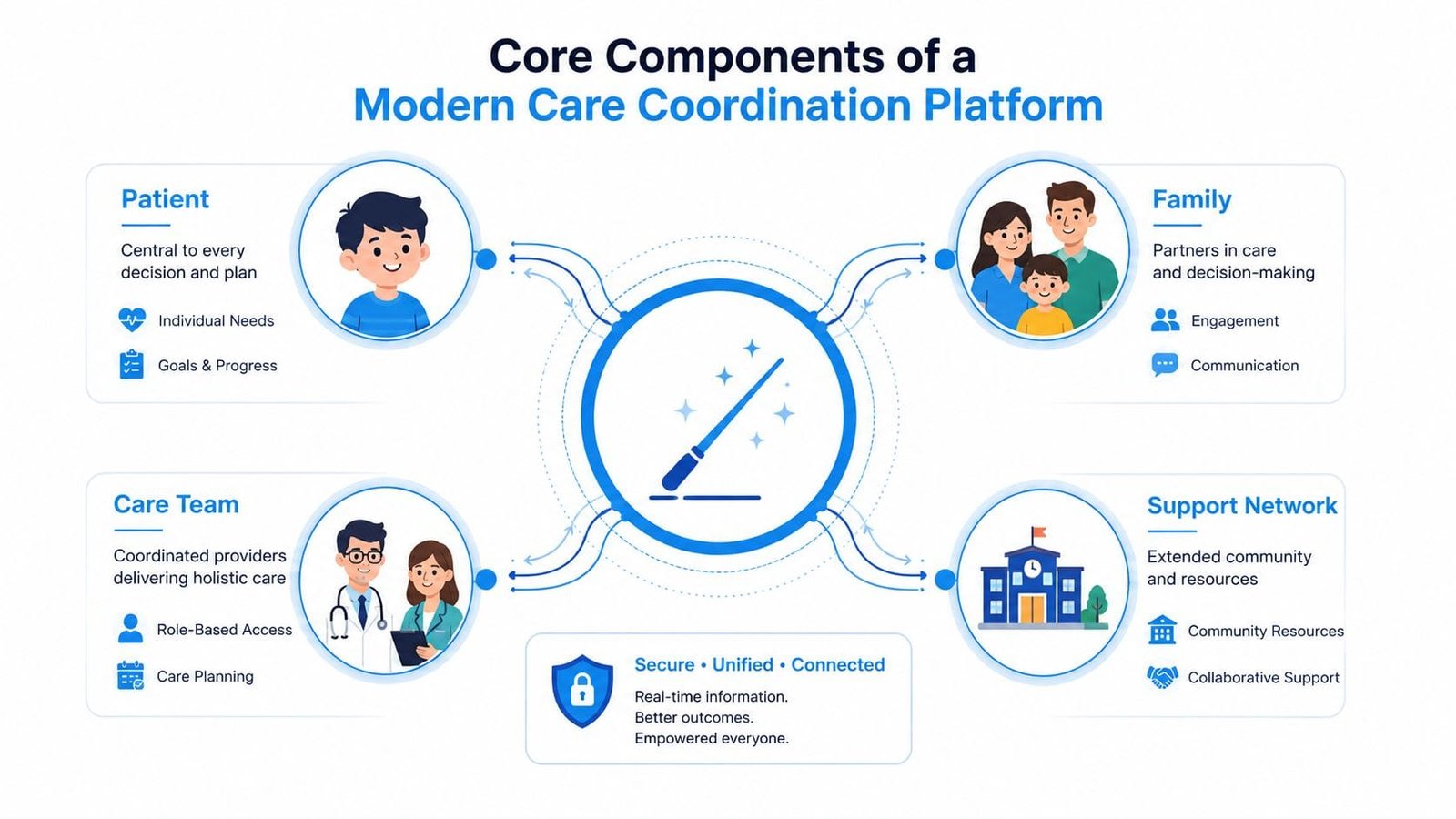
HL7's Coordination of Care Service Functional Model treats coordination as a set of discrete system capabilities, not just shared notes. In plain English, that means the platform should track the patient, the care episode, the care team, the care plan, the clinical event, and the alert as real objects the software can act on, not as loose text fields buried in a message thread. The model also points toward an event-driven backend, which lets the system react when a lab result, medication change, hospitalization, or discharge comes in as defined in HL7's functional model.
Why event-driven design matters to families
Event-driven design is just cause and effect. If a parent logs a meltdown, the relevant teacher, therapist, or family member can see it without waiting for an end-of-week summary. If a medication changes, the updated plan is visible to the people who need it, and the old assumption doesn't keep circulating.
That architecture matters because care doesn't happen in one neat block. It happens between pickup and dinner, during a bus ride, after a doctor visit, and in the space between one appointment and the next. A system that reacts to events helps the family move from manual message passing to timely coordination.
For parents who already juggle calendars, a practical way to think about it is simple. If you've ever needed to sync all your calendars just to see the week clearly, you already understand the value of one shared source of truth. A care platform extends that idea from scheduling into actual care events, which is where the essential work lives.
A strong platform doesn't just hold data. It helps the right person see the right change at the right time.
The best systems also preserve identity and history. The child's episode doesn't disappear when one provider rotates out, and the team doesn't have to rebuild context from scratch every month. That's what makes the platform feel less like software and more like a stable home base.
Essential Features for Neurodivergent Families
Parents don't need abstract coordination language. They need buttons that match real life. A good system should make it easy to log meltdowns, shutdowns, echolalia, demand avoidance, and hand flapping, then capture the context around them, such as time of day, routine changes, diet, sleep, or the people present.
What to log first
Start with the event, then add the why when you can. A short note like “shutdown after noisy gym class” is more useful than a long paragraph no one can scan later. If the child has a rough morning after a poor night's sleep, that detail belongs beside the event, not in a separate memory.
Shared care plans matter just as much. The plan should show goals, supports, medication changes, and upcoming sessions in one place so a co-parent, grandparent, or therapist isn't working from an outdated version. Families don't need a second messaging app for every update, they need coordination built into the same system that holds the plan.
Guiding Growth is a strong example of how that can work in practice. It brings behavior logging, routines, medications, appointments, and collaboration into one mobile experience, and its AI voice logging helps busy parents capture details without typing everything out. It also includes Alma AI, which gives parents on-demand support when they need help making sense of what they're seeing.
How to use the feature set without overwhelm
The trick is to begin small and stay consistent.
- Log the hardest-to-forget events first. Meltdowns, missed meds, or therapy changes are usually the ones parents need later.
- Add one context detail. Sleep, food, or schedule disruption often explains more than the event alone.
- Share the same plan with everyone. Teachers, therapists, and family helpers shouldn't be guessing which version is current.
- Use voice logging when time is tight. A fast entry beats a perfect note that never gets written.
Simple standard: if it helps you explain the child's day to someone else, it should be easy to record in the app.
That's what turns coordination into a daily habit instead of a weekend catch-up project. The system becomes useful when it lowers the friction of telling the child's story.
Why Interoperability and Security Matter
Families often worry that a digital system will make sensitive information easier to lose or easier to misuse. That concern is fair. But a paper trail scattered across backpacks, desks, and home folders is not safer just because it feels familiar.
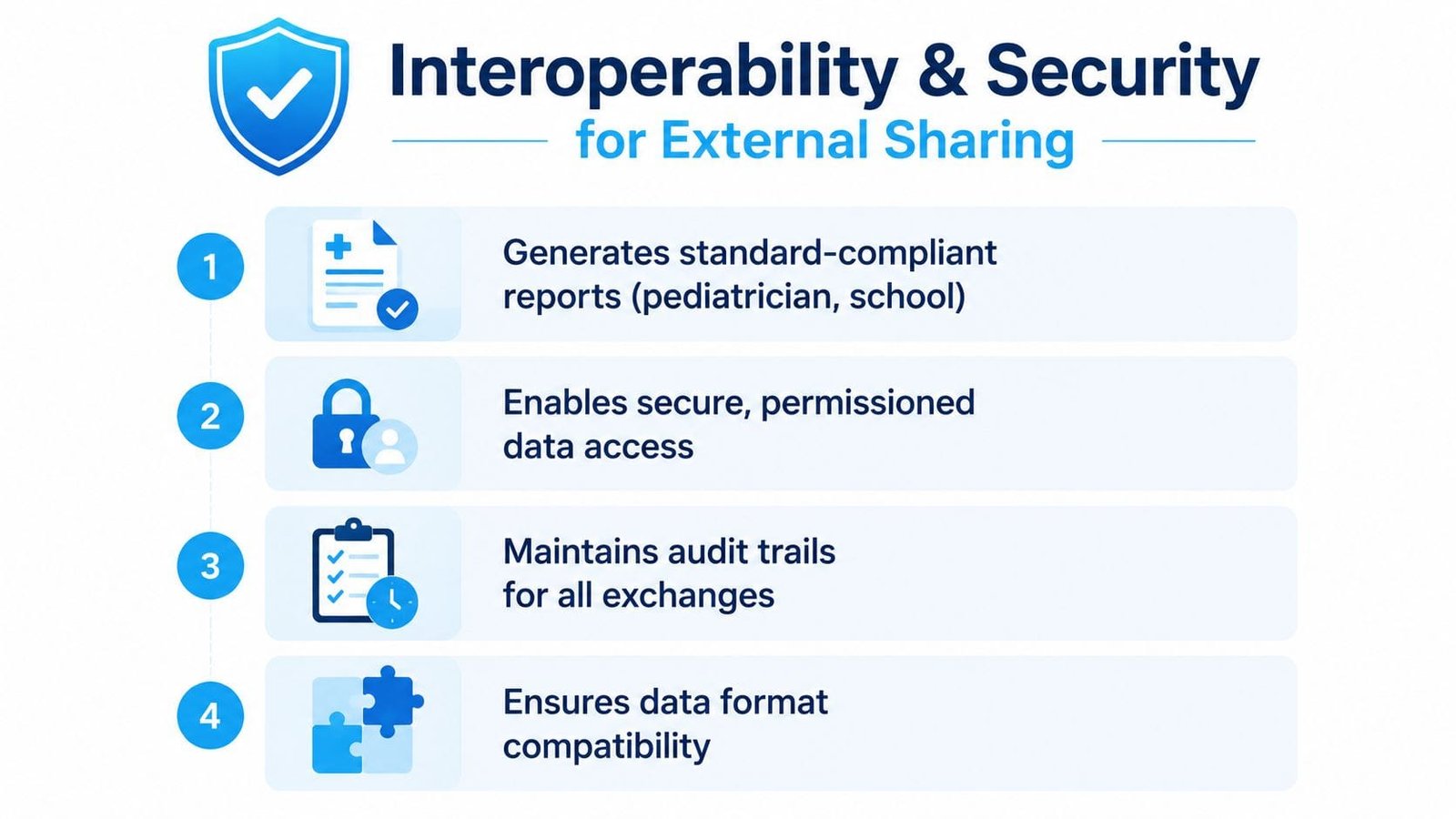
A coordination platform has to produce reports that other people can use. A pediatrician, school district, or outside therapist shouldn't have to decode free-form notes that don't match their workflow. Mature implementations use standardized specifications, structured referrals, and persistent message storage so the same care episode can move between settings without losing provenance, which is why the Victorian service-coordination specifications include a functional specification, a low-level conceptual model, a data dictionary, and an HL7 messaging specification for structured interoperability.
Security is part of good coordination
The security side is just as important. Families need role-based visibility so a teacher sees school-relevant information, a therapist sees therapy-relevant information, and a relative only sees what they're supposed to see. Encryption in transit and at rest, short-lived sessions, and append-only audit trails are the kinds of safeguards that make distributed care feel manageable instead of risky.
The same logic applies when choosing tools for sensitive family workflows. Resources like AIDictation for patient privacy are useful reminders that privacy isn't a feature you tack on later, it's part of how the system has to be built from the start.
The point is not to digitize everything for its own sake. It's to replace vague, lossy handoffs with secure, readable exchange. That's a better fit for autism care, where one missed detail can change the whole week for a child and everyone who supports them.
Measuring Success Through Data Visualization
Raw notes are easy to ignore. A visual pattern is harder to miss. When a system turns logs into charts, parents can see whether rough evenings follow poor sleep, skipped meals, schedule changes, or a specific environment that keeps showing up in the record.
That's why visualization matters in care coordination. AHRQ's coordination chartbook points to measurable domains like transitions of care, preventable emergency department visits, potentially avoidable hospitalizations, medication information integration, and electronic health record use, which shows that coordination gets evaluated through concrete information-handling and outcome domains, not just good intentions AHRQ chartbook. For families, the equivalent is clear charting around routines, transitions, and recurring stress points.
What patterns families can actually use
A chart can show that sleep quality is improving while behavioral incidents are dropping, or that a certain day of the week is consistently harder than the others. It can also help caregivers distinguish a one-off bad afternoon from a pattern that needs an adjustment in routine, environment, or support.
That's the value of data visualization. It moves the family from “I think something's going on” to “this is what keeps happening.” When parents can see the data, they can bring better questions to therapy meetings, school check-ins, and medical visits.
For a practical look at chart-based thinking, this guide on the best ways to visualize data is a useful companion. It shows why clear visuals are easier to act on than pages of scattered notes.
The short video below reinforces the same idea from a different angle, turning information into a form that's easier to interpret.
A well-designed system doesn't tell parents what to think. It gives them a clearer record so they can make better decisions with the people already helping their child.
Implementing a System in Your Daily Routine
The hardest part of adoption is usually not the app itself. It's getting everyone in the family to use it the same way without turning coordination into another chore. Start with the person who feels the most pain from the current mess, then make the first task so easy that it sticks.
A simple rollout that families can live with
Begin with one shared habit. One adult logs behaviors, another handles medications, and a grandparent only checks the plan before pickup. Clear roles keep the system from becoming duplicated effort, and they also reduce the chance that two people enter conflicting information.
Voice-to-text logging is a good first win because it saves time in the exact moment parents usually give up. If someone can say, “Had a shutdown after lunch, seemed tired, no nap,” that's enough to create a useful record. The goal is not perfect documentation, it's consistent documentation.
Then connect the habit to one weekly review. Look for repeated triggers, missed steps, or changes in routines that deserve attention. If the system helps the family prepare for therapy, school meetings, and appointments with less scrambling, it's doing its job.
For families trying to organize everything in one place, this guide on how to organize medical records can help shape the setup. It pairs well with a broader routine because records are only useful when someone can find them quickly.
Best implementation move: assign ownership before you assign data. When everyone knows their role, the app becomes a shared routine instead of a shared burden.
A resistant co-parent usually comes around when the system reduces repetition. A busy grandparent usually engages when the interface is simple and the value is obvious. Keep the first month light, keep the categories clear, and let the results build trust.
Choosing the Right Tool for Your Child
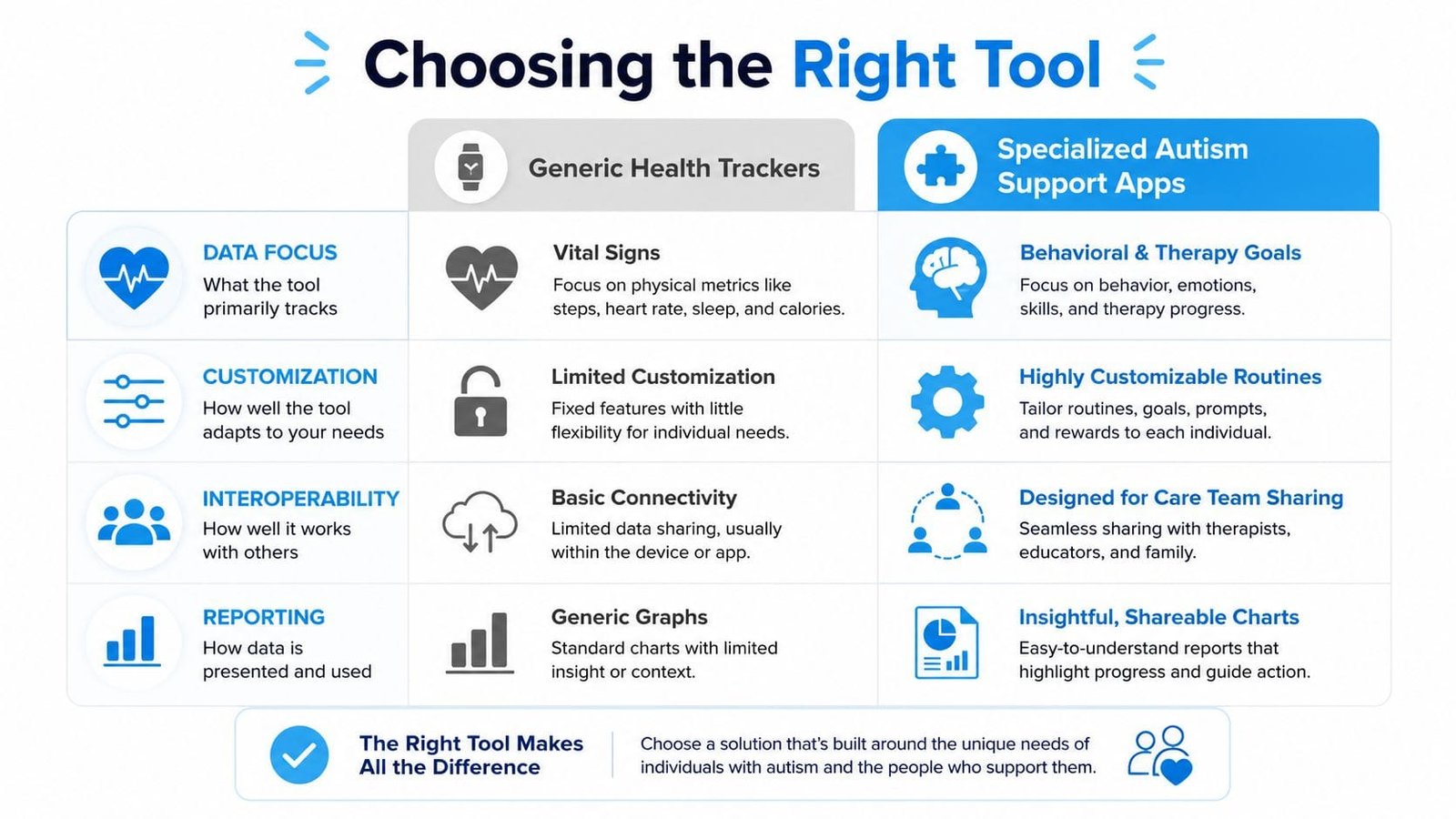
Generic health trackers can log steps, sleep, or mood. That's useful, but autism care asks for more: behavior patterns, therapy goals, shared plans, family collaboration, and exports that help in IEP meetings or specialist visits. A specialized autism support app is built around those realities instead of forcing families to adapt to a general-purpose wellness tool.
What to ask before you choose
Use a short checklist.
- Multiple caregivers: Can parents, grandparents, therapists, and aides all work from the same record?
- Exportable information: Can you share clear summaries for school, therapy, or medical visits?
- AI-assisted support: Does the tool help you log faster or make sense of recurring patterns?
- Family-friendly design: Is it built for the rhythms of real caregiving, not just generic wellness tracking?
Guiding Growth fits that checklist because it was built for neurodivergent family life, not retrofitted from a fitness app. Its mobile-first design, shared tracking, visual summaries, and collaboration tools make it a practical choice for families who want less stress and more clarity. For a closer look at options like this, the comparison page on apps for special needs is a helpful place to start.
If you've been juggling notes, messages, and memory, Guiding Growth can help turn that scattered workload into one shared care system. Visit Guiding Growth to see how the app can help your family track, share, and act on the details that matter every day.