Some mornings fall apart before breakfast.
Your child may be doing fine one minute, then freeze when it's time to get dressed, refuse to leave the house, or melt down when a familiar step changes. As a parent, it can feel like you're constantly narrating, prompting, and trying to prevent the next hard transition. That's exhausting. It also makes many families wonder whether they're missing a tool that could make the day feel clearer and calmer.
An autism visual schedule app can help. Not because it magically fixes stress, but because it makes the day visible. Instead of holding the whole routine in spoken instructions, memory, and repeated reminders, your child can see what's happening now, what comes next, and when something is finished. For many families, that shift alone changes the tone of the day.
Table of Contents
- Why Your Daily Routine Needs a Digital Co-Pilot
- How Visual Schedules Support Autistic Children
- The Ultimate Checklist for Choosing an App
- Setting Up Your First Visual Schedule Step-by-Step
- Beyond the Basics Advanced Strategies for Success
- When a Schedule Is Not Enough The Guiding Growth Advantage
- Frequently Asked Questions About Visual Schedule Apps
Why Your Daily Routine Needs a Digital Co-Pilot
A common family pattern looks like this. Breakfast takes longer than expected. One sock feels wrong. The bus is coming. You say, “First shoes, then backpack,” but your child is still stuck on the fact that today is library day instead of gym. Nothing about that moment is small to them, because the routine no longer feels solid.
That's where a visual schedule stops being “just another app” and starts acting like a digital co-pilot. It holds the sequence in one place. Your child doesn't have to rely only on spoken language, memory, or fast transitions. They can check the next step, return to it, and move through the routine with less uncertainty.
From paper charts to portable support
Many parents start with a laminated chart on the fridge, and that can work well. But family life doesn't happen only at the fridge. It happens in the car, in the hallway outside school, at grandparents' houses, and in waiting rooms.
That's one reason mobile tools became so important. In 2018, Easterseals Assistive Technology highlighted Enuma's Children with Autism: A Visual Schedule as a “wearable picture-based scheduler” for iOS and Apple Watch, with 14 default event icons plus custom photo options in its setup, showing how early app design was already moving toward personalization and portability for routine support and independence (Easterseals Assistive Technology review).
A phone or watch won't solve every transition. But always-available support matters. It means the schedule can travel with the child instead of staying pinned to one wall.
Practical rule: If the hardest moments happen away from home, a portable schedule often works better than a paper system alone.
Why digital can feel easier for families
Digital schedules also reduce some parent workload. You can swap out a picture, reorder steps, or create a one-off routine for “doctor visit” or “grandma's house” without rebuilding everything by hand. That flexibility matters when real life changes quickly.
Some families also pair schedules with accessibility tools that reduce parent effort during setup. If typing or tapping feels like one more task at the end of a long day, these voice dictation solutions can make it easier to capture notes and routine changes on the go.
Consistency matters too. If you've noticed that your child does better when everyone follows the same pattern, this overview of why autism consistency improves outcomes is worth reading. The schedule is only one part of the picture. The bigger win comes when the adults around the child use it in a shared, reliable way.
How Visual Schedules Support Autistic Children
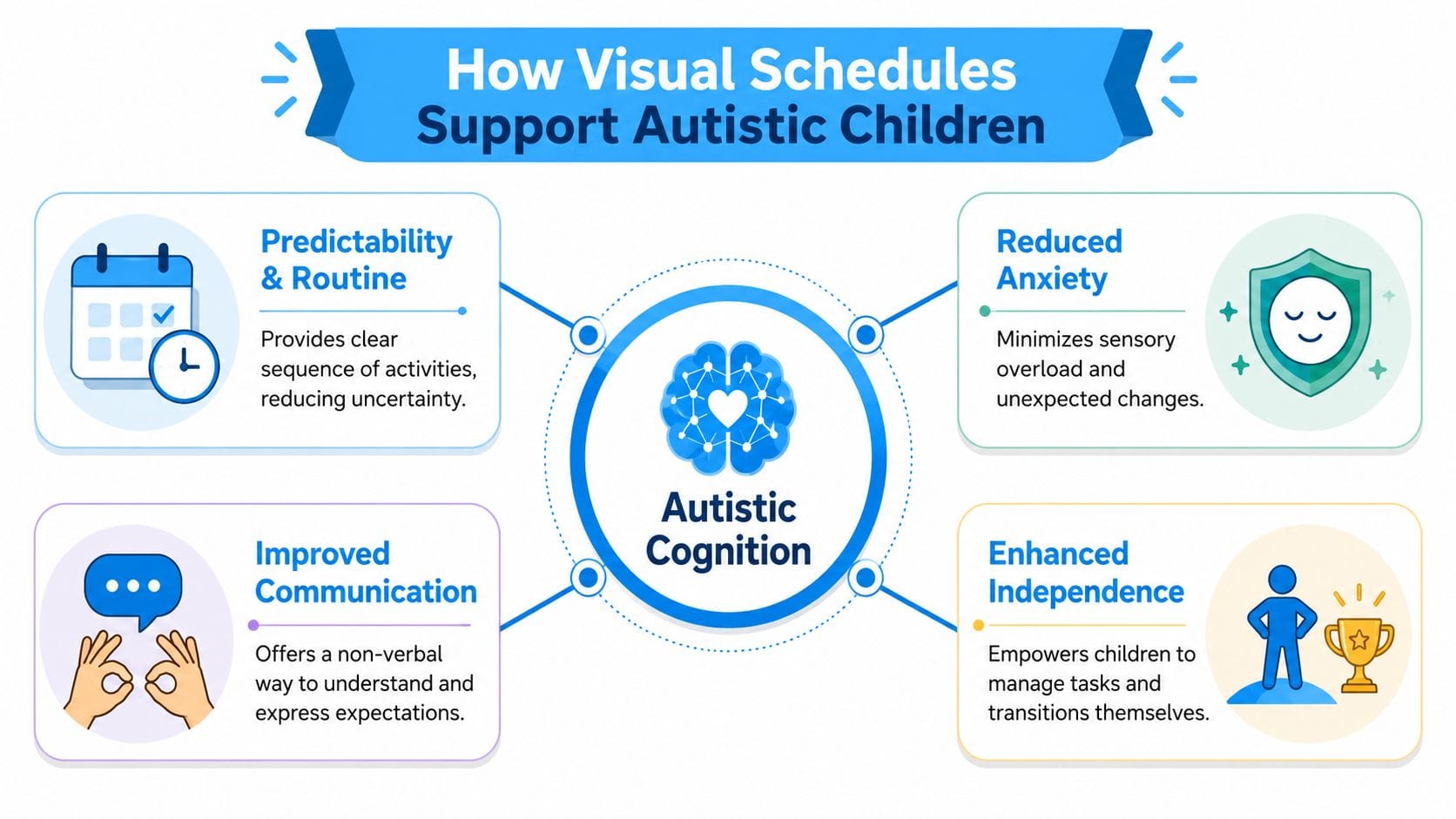
A visual schedule works like a roadmap for the day. Instead of hearing a string of instructions that disappears as soon as it's spoken, your child gets a concrete sequence they can look at again and again.
That matters because many autistic children struggle less with the task itself than with the uncertainty around it. “Get ready for school” is abstract. “Bathroom, get dressed, breakfast, shoes, backpack, car” is much easier to understand.
Predictability lowers the hidden load
When a child can see what comes next, they don't have to keep asking, guessing, or bracing for surprise. That reduces the mental load of transitions. It also gives them a better chance to prepare for something they don't love, because the unpleasant step is no longer popping up out of nowhere.
A good schedule can support:
- Daily routines: Morning, bedtime, homework, and after-school transitions become easier to follow.
- Communication: Pictures or symbols can clarify expectations when spoken language feels too fast or unclear.
- Emotional regulation: Seeing the plan often helps a child feel more anchored during stressful parts of the day.
- Growing independence: The child can check the schedule instead of depending on repeated adult prompting.
It is not just a list
Many parents often become confused. A schedule isn't helpful only because it lists tasks. It helps because it turns time into something visible and manageable.
For example, a child may resist “bedtime” as one big demand. But if bedtime is broken into small visual steps, such as pajamas, toilet, brush teeth, story, lights off, it often feels less overwhelming. The child can focus on one clear action instead of one giant transition.
Children often do better when adults stop repeating the whole routine and start pointing to the next visible step.
That shift changes your role too. You move from constant verbal manager to supportive guide.
Visual support can help the whole household
Parents sometimes worry that using an app means their child will become dependent on it. In practice, many families use schedules as a scaffold. The schedule carries the structure so the child can practice completing it. Over time, some steps may need less support, while new routines can be added when needed.
This is one reason visual tools are useful beyond autism as well. If you want a broader perspective on how external cues support follow-through, this piece on exploring visual reminders for productivity offers helpful parallels.
A strong autism visual schedule app doesn't just help the child. It can lower tension for siblings, reduce repeated prompting for adults, and make handoffs between caregivers feel smoother. Everyone can see the same plan. That shared visibility is often what brings the first sense of relief.
The Ultimate Checklist for Choosing an App
App stores make every tool look polished. What matters is whether the app supports the way autistic children use visual information during routines.
The most important design principle is predictable sequencing with clear completion feedback. Undivided's guidance on visual schedules explains that children benefit when tasks are arranged in order and they can mark them done, such as moving a picture from “to do” to “done,” because that completion cue reinforces predictability and task clarity and can reduce stress around transitions (Undivided visual schedule guidance).
That means the best app for your family may not be the prettiest one. It's the one that helps your child see the order, complete the step, and feel progress.
Must-haves first
Start with the features that directly affect daily use.
- Clear order of tasks: The child should be able to see what happens first, next, and last.
- Easy way to mark completion: Look for drag-and-drop, tap-to-check-off, or a visible done column.
- Photo customization: Personal photos often work better than generic icons, especially for younger children or children who need very concrete visuals.
- Low-friction interaction: If finishing a step takes too many taps, many children will stop using it.
- Flexible routine building: You need to adjust for weekends, appointments, sick days, and school changes.
Nice-to-haves that can still matter
These features aren't essential for every family, but they can make the app much easier to live with.
- Audio support: Helpful for children who benefit from hearing the step as well as seeing it.
- Timers and waiting tools: Useful for transitions like “five more minutes” or “tablet time is over.”
- Shared caregiver access: Important when multiple adults need to use the same routine.
- Privacy and data clarity: Check whether the app makes it easy to understand what information is stored.
What to look for: If your child struggles most at the moment a task ends and the next one begins, completion feedback is not a bonus feature. It's central.
Autism Visual Schedule App Evaluation Checklist
| Feature | Why It Matters | App 1 | App 2 |
|---|---|---|---|
| Task order is visually clear | Helps the child understand sequence without repeated verbal prompts | ||
| Completion action is simple | Reinforces “I finished this” and supports smoother transitions | ||
| Personal photos can be added | Makes routines concrete and familiar | ||
| Routine can be edited quickly | Real life changes. The schedule needs to change too | ||
| Audio prompts are available | Supports children who benefit from combined visual and auditory cues | ||
| Timer or waiting feature exists | Helps with stopping, waiting, and moving on | ||
| Shared use across caregivers | Keeps routines aligned across home, school, and extended family | ||
| Interface is uncluttered | Too much visual noise can make the app harder to use | ||
| Child can use it with minimal help | Supports independence rather than adding another adult-run task | ||
| Privacy settings are understandable | Helps caregivers make informed choices about data use |
Questions to ask before you commit
When you test an app, don't ask only, “Does it have features?” Ask:
- Can my child understand it quickly?
- Can I update it on a stressful day without getting frustrated?
- Will grandparents, babysitters, or school staff know how to follow it?
- Does it support progress, not just display tasks?
An autism visual schedule app should make life simpler. If setup is so complicated that you avoid opening it, it probably won't last in daily family life.
Setting Up Your First Visual Schedule Step-by-Step
You don't need to build a perfect all-day routine on day one. In fact, that's one of the fastest ways to make the whole thing feel too big.
Start with one part of the day that regularly goes off track. For many families, that's morning. For others, it's after school or bedtime. Keep the first version short and concrete.

Begin with one routine
Pick a sequence that happens often enough for practice. Good first choices include:
- Morning routine: Wake up, toilet, get dressed, breakfast, shoes.
- Bedtime routine: Bath, pajamas, brush teeth, story, bed.
- Leaving the house: Coat, shoes, bag, car.
If you want a simple model to adapt, this autism daily schedule template gives parents a useful starting structure.
Use real images when possible
Many children understand familiar photos faster than abstract symbols. A photo of your child's actual toothbrush is often clearer than a generic toothbrush icon. The same goes for their own backpack, bedroom, or breakfast table.
If your child can help take the pictures, even better. That adds buy-in. The routine starts to feel like theirs, not something imposed on them.
Practice when nobody is rushed
Don't introduce the schedule for the first time in the middle of a meltdown or while you're already late. Try it during a calm moment. Walk through the steps together, point to each picture, and model how to mark a task finished.
A simple script works well: “First socks. Then breakfast. When socks are done, we tap done.”
Keep your language short. The schedule should carry the information, and your words should support it, not compete with it.
A short demonstration can also help if you want to see how visual routines are introduced in practice:
Expect adjustment, not perfection
The first version may be wrong. That's normal. Maybe there are too many steps. Maybe one picture is confusing. Maybe “get dressed” needs to become “shirt, pants, socks.”
Try this sequence when refining:
- Notice the sticking point. Where does your child pause, refuse, or become distressed?
- Shrink the step. Make the task smaller and more visible.
- Reduce your talking. Point, pause, and let the schedule do more of the work.
- Celebrate completion. A calm “You did it” is enough.
Some children warm up to a schedule quickly. Others need repeated, gentle exposure. What matters most is that the tool becomes familiar, predictable, and easy to use.
Beyond the Basics Advanced Strategies for Success
Many families can set up a schedule. The harder part is keeping it useful after the first few days.
That's the gap many guides miss. Goally's discussion of visual schedule apps points out that families often get advice on setup, but much less help with implementation consistency across caregivers and with preventing abandonment when routines change (Goally on visual schedule implementation challenges). That rings true in practice. A schedule only works when people keep using it.
What to do when life happens
Real routines aren't perfectly repeatable. Someone gets sick. School starts late. Grandma does things differently. A therapy visit replaces park time. If the schedule can't flex, families stop trusting it.
Build for change by creating a few “special day” versions in advance. You might keep separate routines for home day, school day, therapy day, and outing day. That way you're not rebuilding under pressure.
Resistance also needs a plan. If your child pushes the schedule away, check the reason before assuming they're rejecting the whole system.
- Too long: Cut it down to fewer steps.
- Too vague: Replace symbols with real photos.
- Too adult-led: Let the child tap, drag, or choose the order of preferred activities when possible.
- Too sudden: Practice outside the hard moment first.
Get every adult on the same page
A schedule loses power when one adult follows it closely and another ignores it. Children notice that immediately. Then the routine becomes negotiable, confusing, or inconsistent.
Try a simple caregiver agreement:
| Care team habit | What it looks like |
|---|---|
| Same language | Adults use the same short phrases for each step |
| Same completion cue | Everyone marks tasks finished the same way |
| Same update plan | Changes to routines are shared before the day starts |
| Same expectations | Adults don't skip the schedule when the child protests |
A child doesn't need every day to look the same. They do need the adults to handle the schedule in a similar way.
This is especially important when visual routines connect to broader developmental goals. For example, if a child struggles with turn-taking, waiting, or peer interaction, visual supports can work alongside social skills training with visual supports so the same cues appear across settings.
Know when to refresh the system
An autism visual schedule app can become stale if it never changes. Children grow. Skills improve. Old prompts stop fitting.
Refresh the schedule when you notice any of these signs:
- Your child finishes steps easily: Reduce prompts or combine steps.
- One task always causes friction: Break it down more carefully.
- The routine changed weeks ago: Update visuals so the app matches real life.
- Adults stopped using it: Simplify the process until it's realistic again.
Long-term success doesn't come from making the most detailed schedule. It comes from building one your whole care team can sustain.
When a Schedule Is Not Enough The Guiding Growth Advantage
A visual schedule can show your child what happens next. It can't always tell you why one routine works on Tuesday and falls apart on Thursday.
That's where families often need a second layer of support. Not another app that duplicates the same schedule, but a way to track the context around the routine. Sleep, sensory stress, food preferences, medication timing, appointments, and patterns in meltdowns all shape how well a schedule works.
When routine support needs context
If your child melts down before school, the schedule may not be the whole story. Maybe sleep was rough. Maybe the bus change triggered worry. Maybe a therapy session later in the day is raising stress early. A standalone schedule usually won't capture those patterns.
One option families use alongside routine tools is Guiding Growth, which centralizes behavior logging, sleep, diet, routines, medications, appointments, and caregiver collaboration in one mobile app. It also includes quick voice logging and Alma AI, an in-app parenting support companion, which can help busy caregivers record what happened without relying on scattered notes.

Why shared insight matters
This becomes especially useful when several adults are involved. A parent may notice rough mornings, a teacher may notice shutdown after lunch, and a therapist may see demand avoidance during transitions. If those observations stay in separate places, it's hard to spot the pattern.
A shared tracking system helps caregivers compare notes instead of guessing. Then the schedule becomes one part of a clearer support plan, not the only tool carrying the load.
The question isn't only “Does my child have a schedule?” It's “What else is affecting whether that schedule works today?”
That broader view is often what helps families move from daily reaction to informed adjustment.
Frequently Asked Questions About Visual Schedule Apps
What's the best age to start
There isn't one perfect age. If your child benefits from pictures, routines, and repeated structure, you can start now. Keep it simple and match the visuals to your child's understanding.
Are free apps good enough
Sometimes, yes. A free app can be enough if it shows tasks clearly, lets your child complete steps easily, and doesn't create extra work for caregivers. Paid features are only worth it if they solve a real daily problem.
What if my child ignores the schedule
That usually means the schedule needs adjustment, not abandonment. Try fewer steps, more concrete photos, a calmer practice time, or a clearer done action.
Should I use icons or real photos
Start with whatever your child understands fastest. For many children, real photos are easier at first. Later, some can transition to symbols or a mix of both.
How do I handle unexpected changes
Create a small routine for change itself. For example, show the old plan, name the new plan, and update the visual right away. The goal isn't to eliminate change. It's to make change visible.
Can schools and therapists use the same schedule
Yes, if everyone agrees on the purpose, format, and completion cues. Shared use usually works best when the routine is simple enough that all adults can follow it consistently.
If you're trying to make routines more predictable and also want one place to track behaviors, sleep, triggers, appointments, and caregiver notes, Guiding Growth is worth exploring. It can help families move beyond scattered reminders and toward a clearer daily picture of what their child needs.