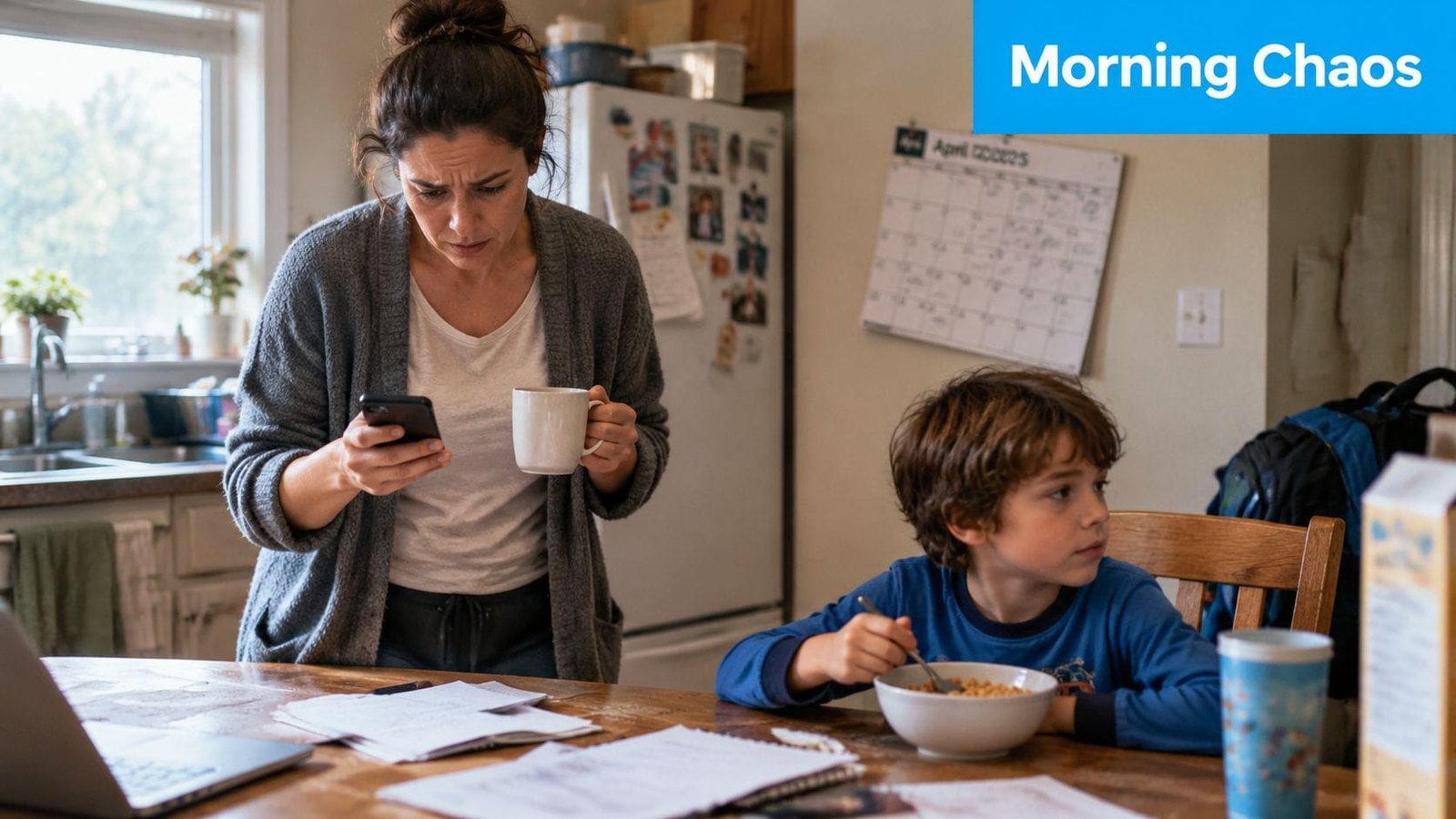
You're halfway through breakfast when one parent asks, “Wasn't the therapy session moved?” The other checks a text thread, the school portal, and a personal calendar. Your child hears several conflicting answers, the morning routine starts slipping, and a small uncertainty becomes a major transition before anyone leaves the house.
For families of autistic and neurodivergent children, family calendar sharing needs to do more than store appointments. It should make the day easier to understand, limit unnecessary surprises, and give caregivers one dependable place to check what's happening. The strongest system is usually the simplest one: shared enough to coordinate care, private enough to respect boundaries, and visual enough for the child to use it directly.
Table of Contents
- The Hidden Stress of Unshared Schedules
- Choosing Your Family Calendar Foundation
- Setting Permissions for Seamless Collaboration
- Visual Cues and Notification Strategies
- Balancing Transparency and Privacy
- Troubleshooting Common Calendar Issues
- Integrating Calendars with Holistic Support
The Hidden Stress of Unshared Schedules
A missed update rarely looks important when someone enters it. One parent changes a therapy appointment but forgets to tell the other. A caregiver arrives expecting the usual after-school routine. A child expects the familiar sequence of school, snack, and home, then discovers that a session, pickup, or unfamiliar location has been added.
Adults may call this a communication problem. A neurodivergent child may experience it as a sudden loss of predictability. The issue isn't stubbornness or a refusal to cooperate. The child may have prepared mentally and physically for one sequence, only to face another without enough warning.
Why fragmented information creates pressure
Calendars, text messages, school emails, paper notes, and verbal reminders each hold part of the plan. Nobody has a complete view, so every person becomes responsible for remembering a different piece. That arrangement forces parents to act as human information systems, and it gives children no stable reference point.
Research into household calendaring found that sharing commonly happens within close personal relationships. In a foundational study, 73% of 30 participants shared a calendar with a significant other, while 23% shared with a family member, 33% with a friend, and 27% with a coworker. The findings place family scheduling within a broader pattern of maintaining awareness, negotiating responsibilities, and reducing daily coordination friction (foundational calendar-sharing study).
Practical rule: If a change affects another person's transportation, preparation, care, or expectations, it belongs in the shared system.
A unified calendar won't prevent every difficult transition. It can prevent adults from giving different answers, though, and that alone can lower the pressure around a change. Families looking for broader methods to coordinate team schedules without stress may find the same principle applies at home: one visible source should carry the current plan.
Choosing Your Family Calendar Foundation
Choose the system your least technical household member can open, understand, and update. A calendar that offers impressive features but gets ignored by one parent or caregiver isn't a shared calendar in practice.
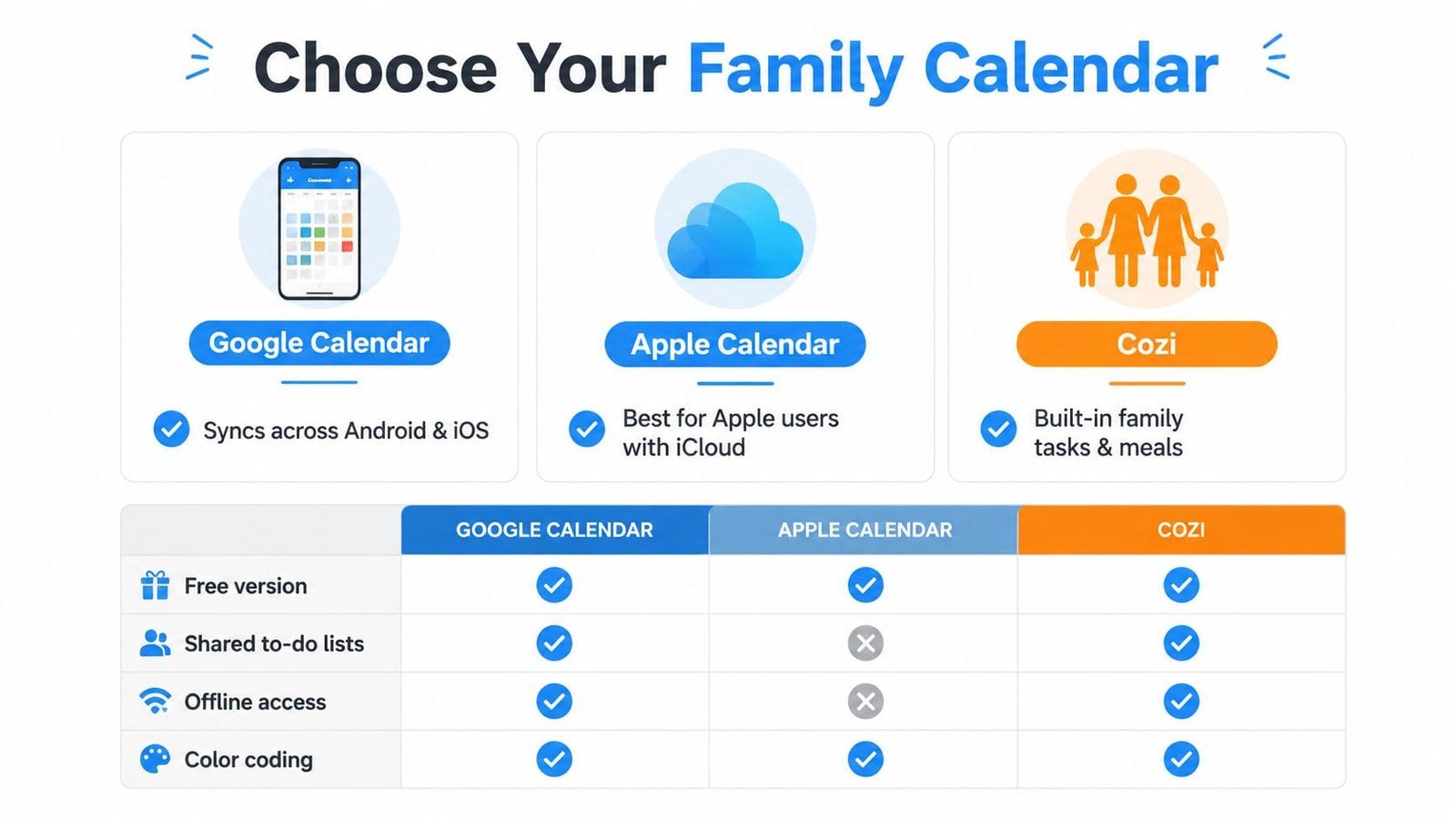
Google Calendar is often a practical foundation for households using both Android and iPhone devices. Apple Calendar fits naturally when everyone relies on Apple devices and iCloud. Dedicated family organizers such as Cozi can make sense when you want scheduling alongside household tasks and meal planning. The right choice depends less on the brand than on device compatibility, accessibility, and daily adoption.
Build one shared layer first
Start with a calendar named something unmistakable, such as “Family Schedule.” Don't begin by sharing every personal calendar. Work meetings, private appointments, and unrelated reminders can bury the events your household needs.
Use this setup sequence:
- Create the shared calendar. Give it a clear name and a small set of consistent colors.
- Add recurring routines. Include school, regular therapy, transport arrangements, and predictable care blocks.
- Invite the people who act on the information. That may include a co-parent, grandparent, respite caregiver, or trusted therapist.
- Test it on every device. Confirm that events appear, notifications arrive appropriately, and edits made by one person become visible to the others.
- Write events for the person who must use them. “Speech therapy, bring headphones” is more useful than “appointment.”
Google's family calendar support describes sharing through the Calendar settings, selecting the family calendar, using Shared with > Add people or groups, adding users or groups, and saving the change. Access can later be removed through the same controls (Google's family calendar sharing guidance).
A paper backup can still help during device problems, especially for children who respond well to a visible household display. A classroom-parent planner resource can also offer ideas for translating school and home responsibilities into a format adults can maintain consistently. For the broader principle of keeping one dependable reference point, see this guide to a single source of truth.
Setting Permissions for Seamless Collaboration
Sharing isn't the same as giving everyone unlimited control. A reliable family calendar assigns access according to responsibility, maturity, and privacy needs.
Parents or primary caregivers usually need permission to add and edit events. Older children may need to view their schedules and add activities that affect transportation, while younger children often benefit from a simplified view rather than edit access. External caregivers should see the information required for their role, not every private detail in the household.
Separate coordination from sensitive notes
Use event titles and descriptions carefully. “Doctor appointment, 3:00 PM” may be enough for a grandparent handling pickup. Detailed clinical notes, behavior observations, medication changes, or family discussions may belong in a restricted record rather than the general calendar.
A useful permission plan can look like this:
- Parents: Edit family events, review changes, and manage access.
- Older children: View relevant events and add activities that affect the household.
- Grandparents and caregivers: View transportation, routines, and appointment logistics.
- Therapists or tutors: Receive only the schedule details needed to provide care or instruction.
- Private calendars: Keep personal work, health, and confidential information outside the shared household layer.
Ownership matters as much as access. If everyone can edit everything, no one knows who should correct an outdated pickup time. Assign a person to maintain recurring appointments, and ask the person who receives a new school or clinic notice to enter it promptly.
Research on family and home-health calendaring describes a clear distinction between shared and private tools. Wall calendars were generally shared primary tools, while mobile calendars were often private aids. The research also identifies privacy concerns, personal preferences, and difficulty managing mobile features as reasons people keep tools unshared (research on shared calendars in home health management).
For a clearer explanation of roles, access levels, and boundaries, review this resource on permission management explained. The goal isn't maximum visibility. It's the right visibility for the right person.
Visual Cues and Notification Strategies
A calendar designed for adults can still be confusing for a child. Dense text, too many colors, overlapping events, and alerts that sound urgent can turn a support tool into another source of sensory strain.
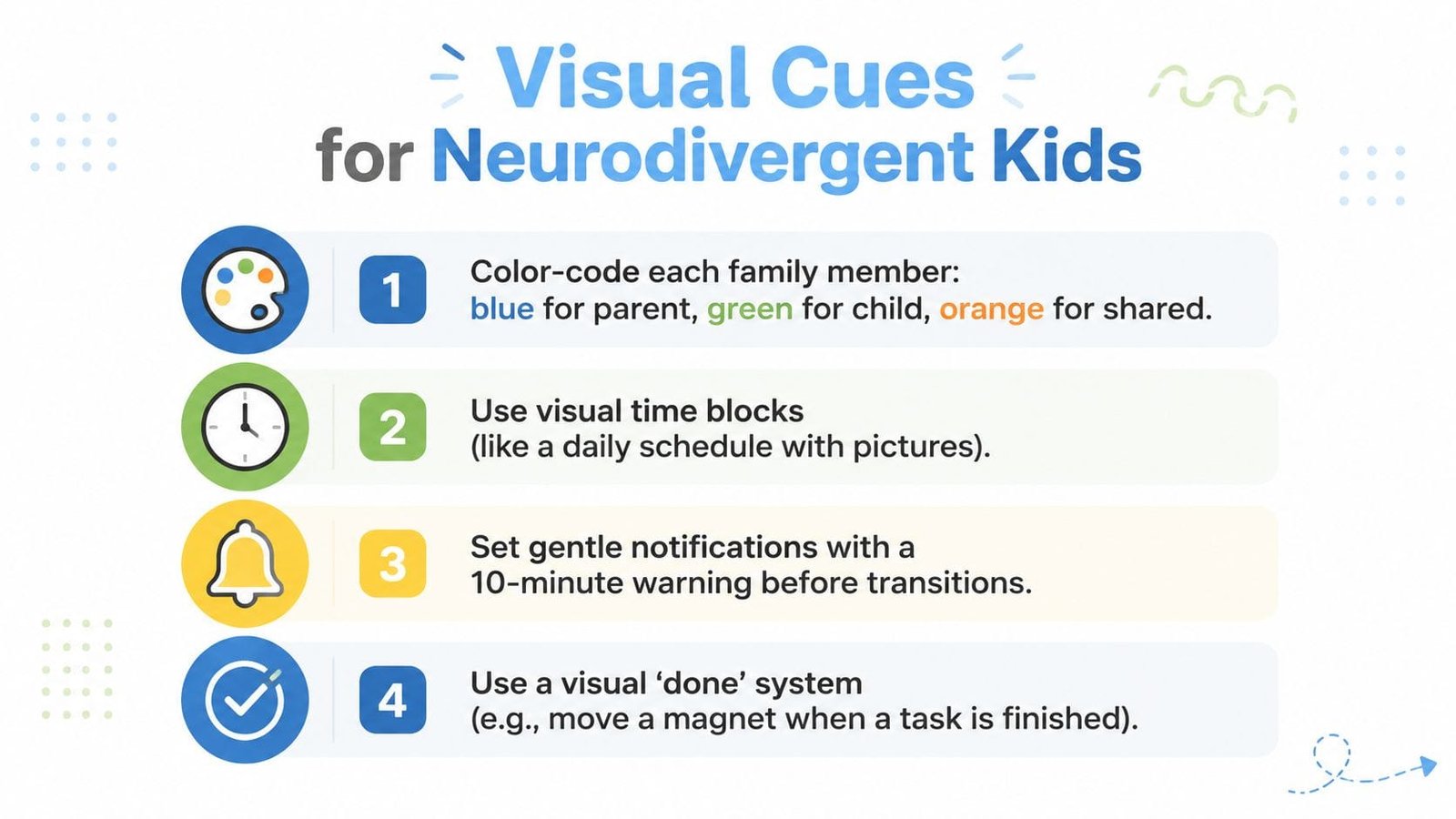
Start with a small visual language. Use one color for school, another for therapy, and another for shared family activities. If colors represent people instead of activity types, keep the meaning stable. Never change the meaning of blue from “parent” one week to “school” the next.
Make the schedule readable before making it detailed
A child may understand a row of simple symbols more easily than a monthly grid full of written events. Show the next meaningful steps rather than every adult obligation. For example, a daily sequence might display school, lunch, sensory break, therapy, home, and bedtime.
The child-centered approach matters because shared calendars are often designed around adult coordination. One family-calendar analysis argues that children may struggle to interpret these adult-centric systems, while earlier household research describes calendars as tools for browsing family life and maintaining coordination rather than supporting child-friendly comprehension (discussion of child-friendly shared calendars).
Use a visual schedule alongside the full caregiver calendar:
- Color blocks: Assign consistent colors to activity categories.
- Symbols or pictures: Pair “therapy” with a familiar icon or photo of the location.
- Short labels: Use “school pickup” instead of a long description.
- Transition warnings: Offer a calm reminder before leaving, packing, or changing tasks.
- Completion cues: Let the child move, check, or hide an activity when it's finished.
Notifications should prepare, not interrupt
More alerts don't automatically create more predictability. A phone that announces every minor edit can produce notification fatigue for adults and sensory overload for children. Select only reminders that support action, such as leaving for school, taking equipment, or preparing for a transition.
A gentle warning works best when it matches the child's processing needs. Some children need a verbal reminder, some prefer a visual cue, and others need both. If a plan changes, update the calendar and explain the change in plain language. Keep the original routine visible when possible, then show what replaces it.
Families that want a child-focused digital routine can explore the visual schedule app for autism support. The principle remains the same regardless of the tool: show less, explain clearly, and keep the visual meaning consistent.
Balancing Transparency and Privacy
A family calendar should answer the questions each person needs for their role, without turning private care information into shared background noise. A caregiver may need the appointment time, location, and transportation responsibility. They may not need clinical observations, family notes, or the reason a clinician is involved.
This boundary matters when several adults support one neurodivergent child. A grandparent might need pickup instructions, while a therapist needs the session schedule. A parent may need the full context and questions for the clinician. Putting every detail in one unrestricted event increases privacy risk and can make the schedule harder for a child to scan, raising stress before transitions.
Use a two-layer information model
Keep the shared calendar focused on coordination:
| Shared broadly | Restricted to appropriate adults |
|---|---|
| Appointment time and location | Clinical notes |
| Pickup and drop-off responsibility | Behavior logs |
| School events and routine changes | Medication details |
| Equipment or preparation reminders | Private family discussions |
Research on shared household tools found that people kept some calendars private because of privacy concerns, sharing preferences, or difficulty managing calendar features. Shared tools supported coordination for multiple people, while private tools served individual needs (home-health calendaring research). The practical boundary is clear: share what coordinates care, restrict what documents personal history.
Give older children increasing control over the parts of the schedule that affect them. Let them view events they own and add suitable commitments, while explaining which changes affect other people. This participation can reduce anxiety around transitions because the child can check the plan and help maintain it, rather than receiving every change as an adult instruction.
Keep sensitive details outside the family calendar. If appointments, medication information, or care notes require tighter access, review whether a HIPAA-compliant app for care information fits the household and professional relationships. The calendar can coordinate who needs to be where and when without becoming the complete care record.
Troubleshooting Common Calendar Issues
When a family calendar fails, start by checking the simplest explanation. The person may be viewing the wrong calendar, using a stale account, or looking at a device that hasn't refreshed. Ask each person to confirm the calendar is visible, the correct account is active, and the event appears in the web version or primary app.
Use a short recovery routine
Work through the problem in this order:
- Check the calendar selector. Make sure the shared family calendar is enabled.
- Check the account. Confirm the device uses the email address that received access.
- Check connectivity. Open another current event or refresh the calendar manually.
- Check permissions. An event may be missing because the person can view only certain calendars.
- Check duplicates. Remove repeated invitations and decide which calendar owns the final event.
- Check recurring events. Edit the single occurrence only when the change is temporary, and edit the series when the routine has changed.
Don't build several overlapping calendars to compensate for one sync problem. Fragmentation makes it harder to know which event is authoritative. Research on shared calendaring documented participants maintaining 18 calendars across 13 people, with an average of 1.36 calendars owned per participant and 2.43 shared calendars accessed per participant (shared-calendar usability research). Those figures illustrate the management burden that can develop when ownership and access aren't clear.
If you connect a reminder app, school platform, or therapy tracker, decide which system owns the event. Let one tool hold the appointment time, while another stores detailed notes or follow-up information. Before relying on an integration for a critical appointment, test a harmless sample event and confirm how edits, deletions, and notifications behave.
A quick screen recording can help a caregiver reproduce a sync issue without a long explanation. When the issue affects a child's next transition, use a printed or spoken backup plan rather than waiting for the technology to resolve itself.
Integrating Calendars with Holistic Support
A calendar shows when an event happens. It does not show what happened beforehand, why a transition became difficult, or which support helped afterward. For neurodivergent children, that missing context can explain anxiety, shutdowns, or sensory overload around an otherwise ordinary appointment.
Keep the shared calendar as the household coordination layer. Store richer information in a care or tracking tool, including sleep, nutrition, medication, therapy notes, behavior observations, triggers, and outcomes. Add only a brief reminder to the calendar, and keep sensitive details visible only to the people who need them.
Connect the schedule to the child's real experience
A therapy session may go smoothly after adequate sleep and quiet decompression time. The same appointment can become difficult after a disrupted night, a crowded school day, or an unexpected transport change. Recording that context helps caregivers judge what support the child needs, rather than treating attendance as the only result.
Guiding Growth is one option for organizing this information. Its described functions include behavior logging, contextual triggers and outcomes, sleep and routine monitoring, diet and nutrition records, medications, doctor appointments, therapy sessions, and collaboration with family members, caregivers, and professionals. Quick voice logging may help when a parent cannot stop to type during a demanding routine.
Use a clear division of responsibility:
- Calendar: Appointment time, location, transport, and transition reminders.
- Support app: Context, observations, care notes, and patterns.
- Family review: A calm check of what changed and what the child may need next.
- Professional collaboration: Relevant information shared with the appropriate caregiver or clinician.
The shared schedule gives everyone the same starting point. Structured tracking explains how the child experienced that schedule and which adjustments may reduce distress next time. Together, these tools support calmer transitions without filling the calendar with sensitive notes.
Guiding Growth brings behavior, sleep, routines, nutrition, medications, appointments, therapy information, and caregiver collaboration into one mobile workspace, with voice logging available when typing is not practical. Visit Guiding Growth to explore how it can work alongside your family calendar and help your care team stay aligned.