You're standing in a grocery aisle with one hand holding a shopping bag and the other keeping your child from dropping to the floor. The fluorescent lights are too much, the cart is blocking the exit, and your child is crying while other shoppers stare. You know the trigger matters. You know the duration and what finally helped will matter later. Reaching for your phone to type a proper note isn't realistic.
That's where hands free note taking becomes more than a convenience. For parents of neurodivergent children, a short spoken log can preserve information that would otherwise disappear during school pickups, bedtime routines, therapy appointments, and the long, disorienting hours of a meltdown. The best system doesn't ask you to stop caregiving so you can document caregiving.
Table of Contents
- Why Hands Free Note Taking Changes Caregiving
- Choosing the Right Voice Tools for Parents
- Setting Up Voice Capture With Privacy in Mind
- Getting Accurate Logs When Conditions Are Messy
- Turning Voice Notes Into a Behavior Journal
- A Practical Week of Hands Free Logging
Why Hands Free Note Taking Changes Caregiving
During the grocery-store meltdown, a parent might manage to say, “Fluorescent lights and crowded aisle, crying for eight minutes, headphones and leaving the store helped.” The sentence takes only a few seconds, but it preserves three details that are easy to lose once everyone is safely home: the trigger, the behavior, and the outcome.
Typing that note requires opening a phone, launching an app, finding the right field, and entering information while your child needs your attention. Even if you remember the event later, fatigue changes the record. “Bad meltdown at the store” doesn't tell a therapist whether the problem was sound, light, hunger, waiting, or an unexpected transition.
Practical rule: Capture the smallest useful version of the event first. Structure and polish can wait until your child is regulated.
Voice logging also fits the moments parents rarely describe as “free time.” You might be carrying a sleeping child after a difficult appointment, supervising a sibling's bath, preparing food, or pacing through a nighttime wake-up. A phone keyboard creates friction in each setting. A voice-first workflow lets your hands stay available while your memory gets an external place to land.
The history of this idea reaches back much further than current parenting apps. Bell Labs introduced Audrey in 1952, a system that recognized spoken digits from a single speaker. By 1962, IBM's Shoebox could understand 16 words, including digits and basic commands. In 1997, Dragon Systems released Dragon NaturallySpeaking, widely described as the first consumer dictation product capable of continuous speech recognition without pauses between words. These milestones trace the move from narrow laboratory systems toward practical voice input for everyday documentation, as described in this history of dictation and speech recognition.
The value for caregiving is not perfect transcription. It's preserving observations before the moment disappears. Those observations can support IEP conversations, medication reviews, pediatric appointments, and therapy adjustments. A voice note doesn't replace clinical judgment, but it gives the adults involved a clearer record to discuss.
Choosing the Right Voice Tools for Parents
Choose from the care situation, not the app store. A tool that works at a desk may fail while you are holding a child, crossing a parking lot, or responding to a sudden escalation. Test how quickly recording starts, whether you can reach it with the screen locked, and whether the result becomes a searchable record instead of a pile of audio.
Match the tool to the moment
Phone-native dictation is the simplest starting point. iOS Dictation and Google Gboard are familiar and work well for a quick sentence when the phone is in your hand or nearby. Their weakness is access. If the phone is locked, buried in a bag, or needed for a call, the workflow can stop before you capture anything.
Smartwatch quick capture removes some of that delay. An Apple Watch or Wear OS device may let you start a recording or dictate a reminder without taking out your phone. The small screen makes editing awkward, but editing belongs later. At capture time, the watch only needs to preserve the observation.
Hands-free wearables suit school pickups and outdoor routines. A lapel microphone or bone-conduction headset can keep the input device available while your hands manage bags, doors, or a child's sensory needs. Expect trade-offs. Microphone placement, battery life, background noise, and the number of steps required to start recording all affect whether the tool works during real care.
Dedicated voice-logging apps fit behavior tracking better than generic reminder tools. Look for an immediate record button, automatic timestamps, structured tags, and a review step. A text-heavy notes app may store information neatly, but it becomes a poor crisis tool if you must type into several fields while a child is escalating.
| Tool Category | Trigger Speed | Lock-Screen Launch | Best For | Limitations |
|---|---|---|---|---|
| Phone-native dictation | Fast when already open | Varies by device and settings | Short observations and reminders | Typing and editing friction can return |
| Smartwatch quick capture | Very fast when worn | Often available through shortcuts | Pickups, walks, and transitions | Small screen and battery dependence |
| Hands-free wearable | Fast after setup | Depends on paired phone or device | Moving, carrying, and outdoor care | Microphone noise and charging needs |
| Voice-logging app | Fast when configured well | Depends on shortcut support | Time-stamped behavior records | Requires privacy and review settings |
Parents often need a different standard from people keeping a general voice journal. Sintera's digital journaling for founders describes ways to turn brief spoken thoughts into an organized digital record. The same approach can help here, but a caregiving tool must require fewer steps and remain usable with one hand, a sleeping child, or attention divided between siblings.
The best tool disappears during the hard moment. If you must remember where a button is, the setup is not ready.
Start with one Home Screen widget, lock-screen shortcut, or watch complication. Practice during calm routines before relying on it during a meltdown, pickup, or night waking. For parents recording care routines alongside behaviors, this guide to logging hours in a caregiving workflow can help separate details that deserve structured tracking from details better kept as a quick reminder. Review the setup after several days. If recordings remain hard to find, difficult to tag, or too slow to start, change the workflow rather than blaming yourself for failing to use it.
Setting Up Voice Capture With Privacy in Mind
A voice note about a child can contain names, diagnoses, medication details, school information, and descriptions of distress. Convenience shouldn't mean sending every recording to a public chatbot or leaving audio scattered across devices. Build the capture habit around minimum necessary data, strong access controls, and a clear deletion policy.
iPhone setup
On an iPhone, begin with Dictation and test whether Enhanced Dictation is available on your software version. On iOS 17 and later, Enhanced Dictation can support offline processing, which may reduce the need to send spoken content to a remote service. Also review Voice Memos and app settings so you can disable cloud synchronization when local storage is sufficient.
Create one obvious shortcut that opens the recording or voice-log action directly. A lock-screen control, Home Screen widget, or Siri phrase can remove several taps. Use a strong device passcode, enable the platform's built-in security features, and avoid saving sensitive audio indefinitely when a reviewed text entry is all you need.
Android setup
On Android, download the appropriate Gboard offline speech pack if your device supports it, and check whether Google Recorder offers an on-device mode on your model. Per-app microphone permissions deserve attention too. An app that only needs microphone access while recording shouldn't necessarily have unrestricted access at all times.
Keep recordings separate from casual voice messages. If an app offers audio analytics, transcript improvement, or automatic clip retention, read the setting before enabling it. For a child's information, parent-controlled encryption and local storage are preferable to convenience features you don't understand.
Wearable and app safeguards
A wearable should lock automatically and require authentication when it's appropriate. Don't dictate identifying details in public if a neutral phrase will work, such as “school pickup note” followed by the relevant observation later at home. Avoid public AI chatbots for raw behavior logs, particularly when the recording includes names or health information.
For families evaluating a dedicated care platform, review its privacy documentation and data controls before building a long-term archive. You can also compare the practical meaning of HIPAA-compliant app support with the protections your child's school, clinician, or care team requires. Compliance language doesn't remove the need to use strong passwords, limit sharing, and verify who can see each entry.
Getting Accurate Logs When Conditions Are Messy
Raw dictation fails for predictable reasons. A child is screaming, a door slams, siblings talk over one another, or you're trying to record from a pocket. The technology may produce a sentence that sounds plausible while changing the name, dose, date, or action. That's dangerous when a note informs medication, school support, or therapy decisions.
Speech input can still be faster than typing. A Stanford HCI and Baidu Research comparison summarized by VoxNota reported that smartphone speech input was 3.0 times faster in English and 2.8 times faster in Mandarin than typing, with a 20.4% lower English error rate. The same source gives a practical illustration: a 150-word note could take about 1 minute spoken compared with 3.75 minutes typed, a difference of roughly 2.75 minutes per note. The VoxNota research summary provides those comparisons and also discusses modern transcription accuracy across varied audio conditions.
Speed doesn't remove review. A JAMA Network Open reported analysis found 7.4 errors per 100 transcribed words in automated clinical transcripts. Professional transcriptionist editing reduced residual errors to 0.4 per 100 words, and physician review reduced them to 0.3 per 100 words. The analysis also found errors in 96.3% of raw speech-recognition notes, which supports a capture-first, correction-second workflow for high-stakes records, as reported by Medical Xpress's summary of the clinical analysis.
Compare the capture methods
| Method | Noise Handling | Latency | Offline Reliability |
|---|---|---|---|
| Cloud dictation | Can benefit from powerful processing, but background voices still interfere | Often responsive with a stable connection | Weak when connectivity fails |
| On-device transcription | Keeps audio local and can work without a network | May vary by device capability | Stronger when the language pack is installed |
| Wearable microphone | Depends heavily on placement and distance from the speaker | Usually quick after activation | Depends on the paired device and app |
Independent clinical evidence identifies context loss as a central failure point. In emergency-department speech-recognition notes, the average was 1.3 errors per note, 71% of notes contained at least one error, and 15% contained one or more critical errors. Another review cited error rates from 10% to 23% in clinical documents, while a 2025 systematic review reported word error rates ranging from 0.087 in controlled dictation to more than 50% in conversational or multi-speaker scenarios. The Joint Commission evidence document explains why names, doses, dates, and other high-risk details require verification.
Use three habits: pause between trigger, behavior, and outcome; add your child's name and relevant diagnosis terms to custom vocabulary; and replay or reread anything that will guide a clinical or educational decision. Keep the first spoken note short, then add tags when calm returns.
Turning Voice Notes Into a Behavior Journal
A raw voice memo is useful only if you can find it and understand it later. The practical transformation is simple: record the event in plain language, then attach the context that helps another adult interpret it. A useful entry usually answers four questions, what happened before, what did the behavior look like, what did you do, and what happened afterward.
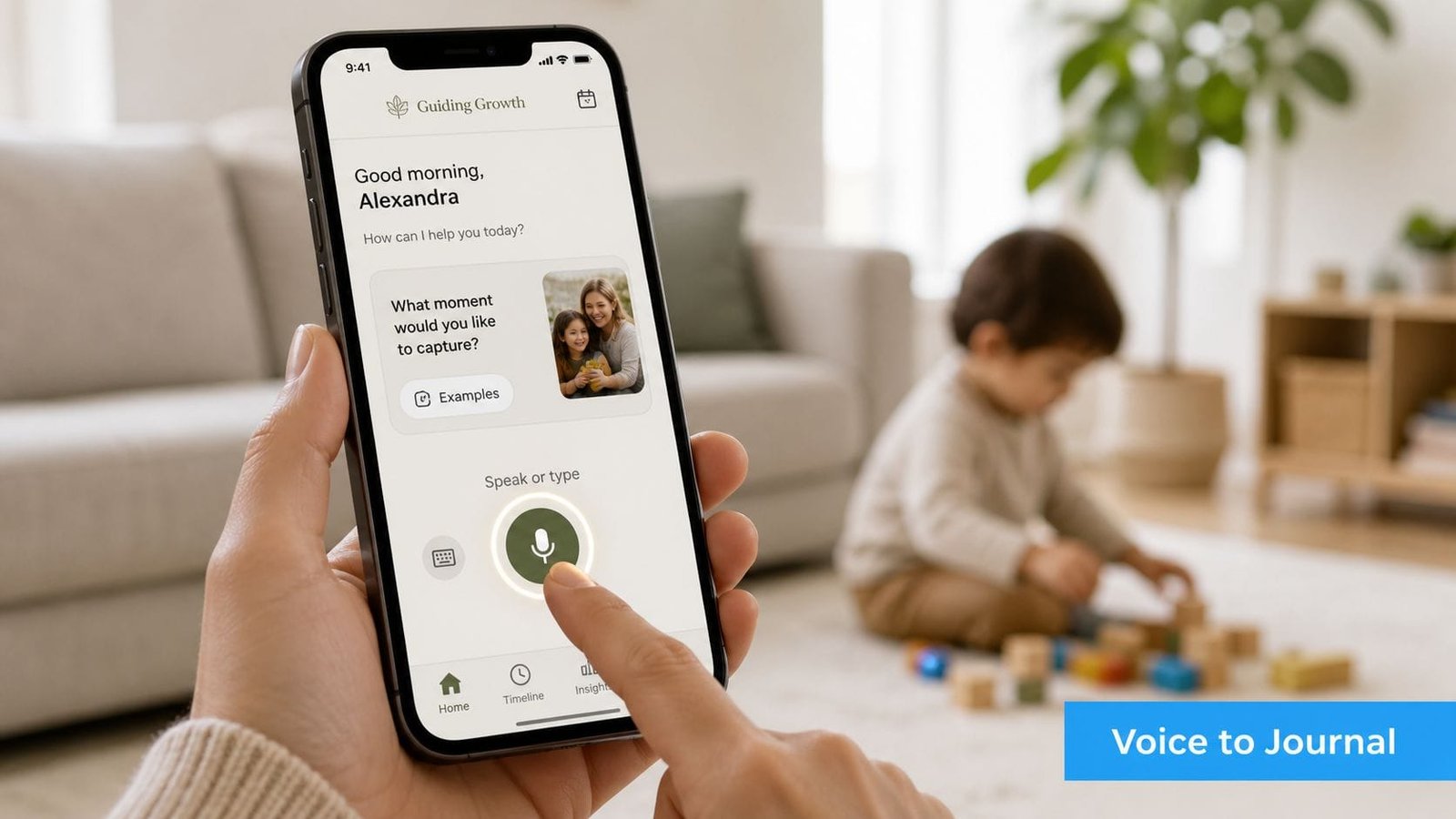
In a structured workflow, you open the voice logger, tap the microphone, and speak naturally. Say, “Grocery store, fluorescent lights, covered ears and crying, left after several minutes, headphones helped.” The app can then turn that spoken observation into a dated entry with tags for setting, trigger, behavior, intervention, and outcome. You don't need to compose a perfect clinical sentence while your child is distressed.
Three ordinary moments worth capturing
The grocery-store sensory event might begin with a sudden change in lighting or noise. Record the observable details rather than guessing at intent. “Covered ears, pushed the cart away, cried, accepted headphones, regulated after leaving” gives a care team more to work with than “hated the store.”
The after-school shutdown may look quieter. A child arrives home silent, refuses food, and goes directly to a familiar space after a long school day. That entry can include the transition, the silence, refusal to eat, and what reduced demands. Shutdowns are easy to miss in a journal designed only around loud or disruptive behavior.
The dinner and sleep observation needs careful language. If you introduce a new food and later notice disrupted sleep, record the food, timing, portion in ordinary terms, bedtime routine, and sleep behavior. Don't label the food as a confirmed cause based on one observation. A searchable record helps you and the child's clinician examine whether the pattern repeats.
A platform designed for behavior, sleep, nutrition, medication, and appointments can keep these observations together rather than spreading them across voice memos, text messages, and paper scraps. Clear charts can also help families understand ways to visualize care data without turning every difficult day into a spreadsheet.
The journal remains a record of observation, not a diagnosis. Parents, pediatricians, educators, and behavior specialists still need context and professional judgment. Voice logging makes it more likely that the context survives the moment.
A short video can demonstrate how voice capture fits into a moving caregiving routine:
A Practical Week of Hands Free Logging
You don't need new hardware to test this approach. The phone already in your pocket can show whether voice capture reduces the gap between noticing an event and recording it. Keep the experiment small, private, and focused on one daily moment.
Seven days to build the habit
Day 1, audit what already exists. Look at paper notes, text messages, calendar reminders, and saved voice memos. Pick one repeatable moment, such as the morning routine or school pickup, and decide what information would make that moment useful later.
Day 2, configure the phone. Turn on dictation, install an offline speech pack where available, and add your child's name to the custom vocabulary. Create one shortcut that opens recording immediately. Don't optimize every setting yet. Remove the first barrier.
Day 3, capture one event by voice. Use a short format: setting, trigger, behavior, response, outcome. If the morning is calm, record a routine observation instead. The point is to practice the action before a crisis demands it.
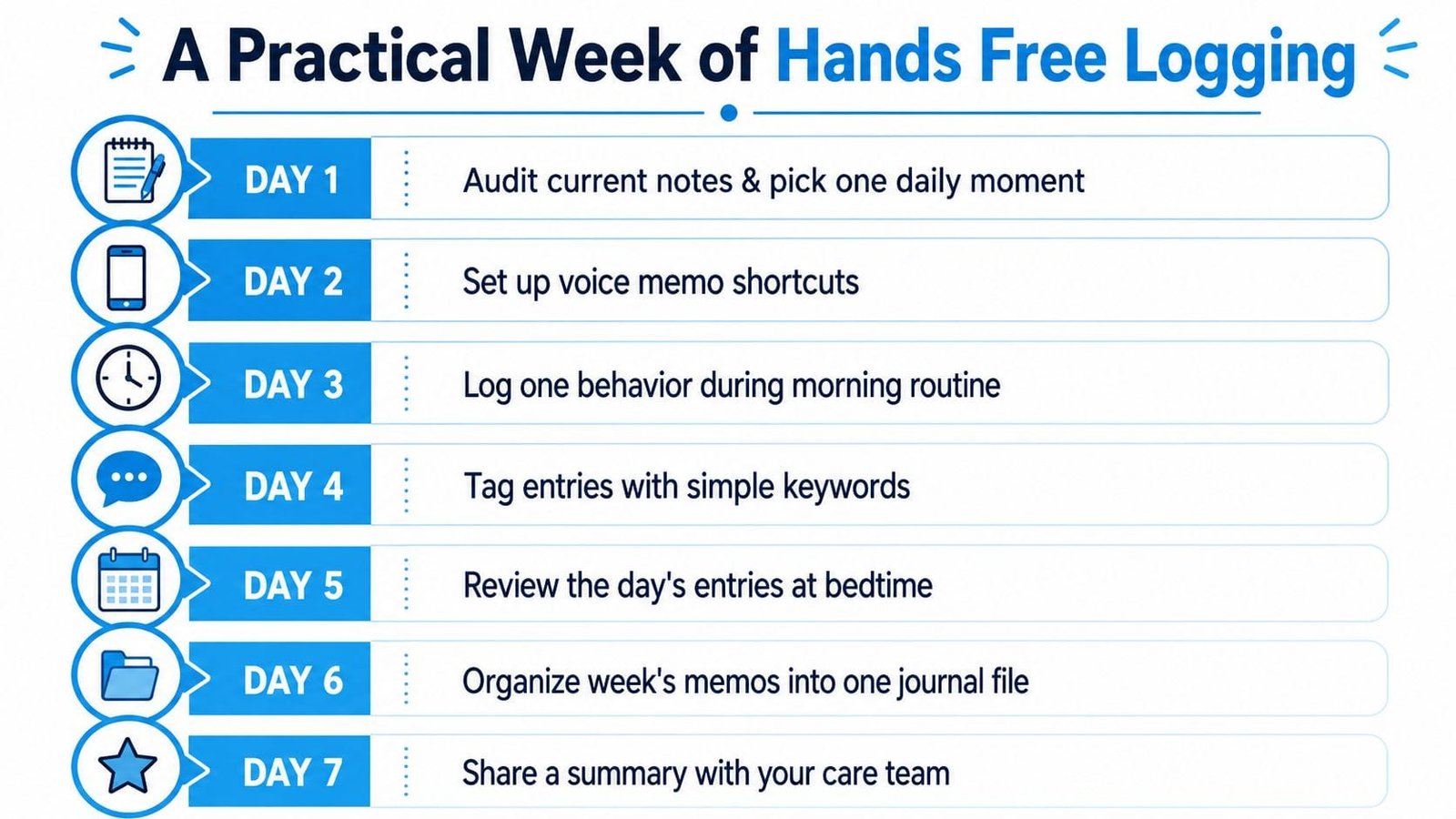
Day 4, review and tag. Correct names, dates, and other transcription errors. Add simple tags such as sleep, transition, noise, food, shutdown, or sensory input. Keep the vocabulary consistent so patterns remain searchable.
Day 5, test collaboration. Share one redacted entry with a co-parent or therapist, removing details that aren't necessary for the recipient. Ask whether the entry clearly communicates what happened and what support helped. If it doesn't, change the recording prompt rather than adding a long form.
Day 6, tighten privacy. Review microphone permissions, cloud synchronization, audio retention, device passcode settings, and lock-screen access. Keep only the tools you can explain and control. Privacy is part of a usable workflow, not a separate technical chore.
Day 7, decide what stays. Review the week and identify which moments were easier to capture by voice. Keep two habits, such as recording immediately after an event and reviewing entries at bedtime. Drop anything that creates more work than value.
The best system won't capture every event. It will capture enough of the right events to reduce guesswork, support better conversations, and help you notice patterns without requiring you to abandon the child in front of you. For parents with motor impairments, caregivers carrying children, or anyone managing unpredictable routines, the physical design matters as much as transcription quality. Dedicated hands-free hardware can be more practical than a phone when accessing, swiping, tapping, or sustained grip remains a barrier, a concern discussed in this review of hands-free note taking for physical disabilities.
Multilingual and accented speech deserves the same realism. Clean native-English audio may perform well, but independent coverage notes that some accented speakers can experience 10% to 20% word error rates, with cross-talk, background noise, code-switching, and poor microphones creating further problems. Healthcare documentation can save time when audio quality and review are controlled, but the correction burden returns when those conditions aren't met, as discussed in this coverage of AI meeting transcription trade-offs.
Hands free note taking works best as a safety net, not an autopilot. Start with one shortcut, one repeatable moment, and one review habit. When you're ready to replace scattered memos with a private, searchable care record, Guiding Growth offers zero-typing voice logging for behaviors, triggers, outcomes, sleep, nutrition, medications, appointments, and collaboration with your care team. Try it during your next ordinary routine, then use the resulting record to make your next caregiving conversation more specific.